
1,154features across all RoGold apps
Everything RoGold does
Across the extension, the desktop app, the Studio plugin and iPhone, sorted by what you want to do.
Search and discover games
Search all of Roblox at once, and know what a game is like before you open it.
PowerSearch
FreeExperiences, people and items from anywhere on Roblox, with Ctrl K.
ExtensionDid you mean @username
FreeSearch games for someone's name and PowerSearch offers their profile, or offers the game when you search people.
ExtensionDevForum search
FreeSearch the DevForum from PowerSearch, narrowed to any forum category.
ExtensionCreator docs search
FreeSearch the Roblox Creator docs from PowerSearch, across Engine or Cloud.
ExtensionMy games search
FreeFind your own games in PowerSearch, with Edit in Studio and Creator Hub buttons on each.
ExtensionCreator Store search
FreeSearch Creator Store models from verified creators without leaving the page.
ExtensionRecent searches
FreeYour recent searches and opened results, ready the next time you open PowerSearch.
ExtensionPlay from search
FreePlay a game, add it to a playlist or open your private servers straight from a search result.
ExtensionFriends first in search
FreeFriends who match your search show above everyone else, by display name or username.
ExtensionJoin and trade from search
FreeJoin a friend's game or start a trade right from a person in your results.
ExtensionCommunity search
FreeSearch communities from PowerSearch, with the ones you are in marked.
ExtensionCommand palette
UltimateType ">" in PowerSearch to run commands and change settings from the keyboard.
ExtensionGame reviews
FreeA reviews tab and star rating on every game page, so you know before you play.
ExtensionDiscover, rebuilt
FreeA cleaner Discover page with better sorts, or a simple mode with only the games.
ExtensionSpotlight
UltimateA search overlay for games, people, items and groups that launches a game straight from a result.
Desktop appPlaylists
FreeKeep games in collections of your own and pin them to your home page.
ExtensionPinned games
FreePin the games you come back to, so they are always one click away.
ExtensionFavorites, organized
FreeSort and search your favorite experiences, items and creators in one place.
ExtensionLive game stats
FreeActive players, favorites and visits update on the game page as they change.
ExtensionGame trailers
FreeWatch an experience's videos right on its page.
ExtensionSubplaces
FreeOpen the other places inside an experience from its main page.
ExtensionOrganizable tabs
FreePut a game page's tabs in the order you want.
ExtensionBanned and hidden games
FreeOpen the pages of banned or under-review games instead of an error.
ExtensionInstant page loads
FreeGame data is fetched ahead of time when you hover a game card or a carousel shows it.
ExtensionQuick previews
FreePoint at a user or group to see a preview, including a 3D avatar.
ExtensionShort links
FreeShort, clean links to share the page you are on.
ExtensionSearch results, rebuilt
FreePeople, communities and experiences in redesigned search results.
ExtensionCreator player count
FreeHow many people are playing someone's games right now, on their profile.
ExtensionTop songs
FreeThe songs an experience plays, listed on its game page.
ExtensionSong pages
FreeA page for each song with a player, the experiences that feature it and more by the artist.
ExtensionEvent pages
FreeA rebuilt page for each experience event, with how many people are going.
ExtensionDeveloper posts
FreeA game developer's latest posts from X, on the game page.
ExtensionBlocked keywords
FreeHide games with words you choose in their names from every list.
ExtensionTrending games
UltimateShort lists of the tracked games gaining, breaking out, reviving and declining right now.
Desktop appValues in PowerSearch
FreeRolimons values on the limited items PowerSearch finds.
ExtensionExact vote counts
FreeA game's full like and dislike counts, not rounded ones like 1.2K.
ExtensionLatest game update
FreeThe developer's most recent published update, shown in the game page's About section.
ExtensionGame avatar rules
FreeSee the avatar type, animation and scale rules a game forces on you before you join.
ExtensionUpdates from favorites
FreeA Home section with the latest update from each of your favorite experiences.
ExtensionWatch games
FreeWatch a game from its page, and its updates and events appear in your RoGold calendar.
ExtensionFollow events to your calendar
FreeNotify me on an event follows it in your RoGold calendar as well as on Roblox.
ExtensionGame card info
FreeAn info button on game cards that shows players, likes, visits, favorites and events coming up soon.
ExtensionDiscovery roulette
FreeRoll the dice for a random game from the charts, from the top 10 up to the top 10,000.
ExtensionOwned paid experiences
FreeThe paid-access experiences you have bought, in a row on the charts page.
ExtensionSearch suggestions
FreeRoblox's game search suggestions as chips in PowerSearch, to search a phrase or open a game.
ExtensionTrending searches
FreeWhat people are searching for on Roblox, shown before you type in PowerSearch.
ExtensionRoGold search results
FreePeople and games RoGold already knows about come first in PowerSearch, ahead of Roblox's results.
ExtensionPrivate and removed tags
FreePrivate and removed games stay in favorites and community lists with a tag instead of vanishing.
ExtensionFinished by RoGold users
UltimateWhat share of RoGold users have finished each game, next to your badge progress.
ExtensionHide recommended games
FreeHide games from your Home recommendations, then unhide them one by one or all at once in settings.
ExtensionSubplace pages
FreeA subplace opens as its own game page with its own players, server size and dates.
ExtensionWrite game reviews
UltimateWrite, react to and report reviews on any game page.
ExtensionAll-ages review notice
FreeA notice on the game page while Roblox reviews a game for all ages.
ExtensionDiscover simple mode
FreeStrip the Discover page down to just the game rows.
ExtensionFeatured games banner
FreeA large rotating banner of featured games at the top of Discover.
ExtensionFriend activity on Discover
FreeSee what each of your friends is playing right now, at the top of Discover.
ExtensionYour most played
FreeThe games you have played the most, as a row on Discover and your home page.
ExtensionGlobal most played
FreeA home page row of the games RoGold players spend the most time in.
ExtensionCommunity picks
FreeGames voted for by the RoGold community, sortable by votes, on your home page.
ExtensionXP games
FreeGames whose badges earn you RoGold XP, with how many of them you have claimed.
ExtensionGameplay previews
FreePoint at a game card to watch its gameplay video play inside the card.
ExtensionPaid access prices
FreeThe Robux price of paid-access games, shown right on their cards.
ExtensionAdd friends from search
FreeSend or answer friend requests and see who is online, right in people search results.
ExtensionBulk unfavorite
FreeSelect many favorites at once and remove them together.
ExtensionAdd to playlist from cards
FreeA button on every game card to drop the game into any of your playlists.
ExtensionShare and import playlists
FreeCopy a playlist as a code to share, and paste one to import a friend's.
ExtensionPlaylist rows on Home
FreeEach playlist as its own row on your home page, reordered, resized or hidden as you like.
ExtensionRestricted games shown
FreeGames your account cannot open still show up in search, marked as restricted.
ExtensionBanned users in search
FreeFind a banned account by its exact name and open its profile.
ExtensionItem search filters
FreeFilter item results by category, price range and sort, with off-sale items if you want them.
ExtensionRedesigned game page
FreeA faster rebuilt experience page with RoGold features built in, also open to signed-out visitors.
ExtensionBuy paid-access games
FreeBuy a paid-access game with Robux or local currency straight from the Play button.
ExtensionParental unlock request
FreeA blocked child can ask a linked parent to unlock the experience from the page.
ExtensionPlay demo
FreeA Play Demo button for locked experiences that offer a demo.
ExtensionAdd game to profile
FreeAdd or remove your own experience from your Roblox profile.
ExtensionVoice and camera support
FreeShows whether the experience supports voice chat and camera.
ExtensionPlatform support
FreeIcons for which of computer, console and mobile can play it.
ExtensionAge rating details
FreeThe age recommendation and its content descriptors, linked to Roblox's policy.
ExtensionBadge search
FreeSearch a game's badges by name or description.
ExtensionBadge filters and sorts
FreeFilter by owned, not owned or available; sort by rarest, most common or newest.
ExtensionSong previews
FreePlay and pause a song preview right on the game page.
ExtensionEvents tab
FreeA dedicated tab for an experience's events, shown only when it has some.
ExtensionPast events
FreeBrowse an experience's finished events as well as upcoming ones.
ExtensionJoin live events
FreeJoin an event that is happening now straight from its card.
ExtensionSpend in this game
FreeHow many Robux you have spent in an experience and on how many purchases, on its page and linked to the spend explorer.
ExtensionStore search
FreeOne search box filters both passes and developer products.
ExtensionBuy game passes
FreeBrowse and buy game passes from the page, with a toggle to show off-sale ones.
ExtensionGame subscriptions
FreeSee an experience's subscriptions and subscribe from the page.
ExtensionPlaytime on reviews
FreeEach review shows the reviewer's playtime when they wrote it and now.
ExtensionFavorite songs
FreeFavorite or unfavorite a song from its page.
ExtensionExperiences using a song
FreeSee which experiences feature a song and their rating.
ExtensionClassic vote bar
FreeLike and dislike buttons with counts and a ratio meter on the game page.
ExtensionClassic card rating
FreeGame cards show a like ratio meter with exact like and dislike counts.
ExtensionLive player count
UltimateSee how many are playing a game right now, compared with an hour, a day, a week and a month ago.
Desktop appChart zoom and pan
UltimateDrag across a game chart to zoom in, then move along it or reset with the zoom buttons.
Desktop appDay view
UltimateSee a game's players hour by hour and step through one day at a time.
Desktop appChart mark filters
UltimateShow or hide updates, events, player spikes and Roblox outages on game charts, and the choice is remembered.
Desktop appEvent results
UltimateUpcoming events with the turnout we expect, and past events with the players they drew against our prediction.
Desktop appGame records
UltimateA game's peak players over each period RoGold has tracked it, and its rank among tracked games.
Desktop appServer regions
UltimateSee which continents a game's servers are in, based on servers RoGold users joined.
Desktop appSimilar games
UltimateTracked games in the same genre with a similar number of players.
Desktop appGame details
UltimateA game's description, when it was made and last updated, and its server size, read live from Roblox.
Desktop appDaily figures table
UltimateA game's last month as one row per day, so you can read the exact numbers behind the charts.
Desktop appGame history export
UltimateSave a tracked game's history as a CSV file.
Desktop appGame list export
UltimateExport up to 1,000 games to a CSV file, filtered and sorted the way you see them.
Desktop appAdvanced game filters
UltimateFilter games by players, likes, visits, server size, creator, genre and the dates they were made or updated.
Desktop appGrowth and record sorts
UltimateSort games by fastest growing, declining, reviving, new records, peak players or newest.
Desktop appGame screener presets
UltimateUse ready-made screens like Rising now and Reviving, or save your own sort, filters and view.
Desktop appWatchlists
UltimateKeep games, creators and genres in named lists with their latest numbers side by side.
Desktop appGame alerts
UltimateGet notified when a game you watch sets a record, surges, updates or passes a player count you set.
Desktop appCreator and genre alerts
UltimateGet notified when a creator you watch releases a game or a game in a watched genre climbs fast.
Desktop appEvent reminders
UltimateGet a reminder before an event starts in a game you watch.
Desktop appAlert summaries
UltimateGet alerts as they happen or grouped hourly or daily, plus an optional daily or weekly summary.
Desktop appCompare games
UltimatePut two to five games on one chart, by players or growth, with their numbers side by side.
Desktop appSaved comparisons
UltimateSave a set of games as a group so you can open the same comparison later.
Desktop appRising terms
UltimateWords in game names that are gaining players right now.
Desktop appGenre explorer
UltimateEach genre's players, share and trend, with its top games, newest games and sub genres.
Desktop appStudio explorer
UltimateBrowse the studios behind tracked games, with each studio's games and their players over 90 days.
Desktop appNew game launches
UltimateRecently launched games and how they did over their first day, week and month.
Desktop appGames for you
UltimateGames from the genres you play most, plus games you have played that are gaining players again.
Desktop appHome games card
UltimateA card on the app's Home screen with your watched games, rising games and recently updated games.
Desktop appGames catalogue
UltimateBrowse the most played Roblox games RoGold tracks, as a grid or a table of figures.
Desktop appRoblox-wide game search
UltimateGames outside the catalogue still turn up from Roblox search, ready to play, pin or make a shortcut for.
Desktop appRequest game tracking
UltimateAsk RoGold to start tracking a game so it gets charts and history.
Desktop appGame history charts
UltimateChart a game's players, daily visits, like percentage and RoGold playtime over 7, 30 or 90 days.
Desktop appBusy time predictions
UltimateWhen a game is usually busiest in your own week, and how this week compares with last.
Desktop appUpdate calendar
UltimateA year of a game's updates as a heatmap, one square per day.
Desktop appSpotlight game suggestions
UltimateBefore you type, Spotlight lists your watched games, rising games and games updated this week.
Desktop appOverlay search
UltimateOne search over games and people: join a game or open a profile right from the overlay.
Desktop app
Servers and playtime
Pick the right server, run several windows, and keep a record of where you played.
Server browser
FreeRegion, player counts, health and friends on every server, so you pick a good one.
ExtensionMulti-instance
FreeRun several Roblox windows at the same time, up to three accounts on Free.
Desktop appPlaytime
FreeHow long you have played in each experience.
ExtensionPlaytime history and heatmap
UltimateYour playtime day by day on a year-long heatmap, and each session from when detailed tracking is on.
ExtensionPassports
FreeEvery experience you play becomes a passport of stamps and records.
ExtensionInstant join
UltimatePress Play on the website and the desktop app launches you straight in.
ExtensionQueue to join
FreeJoin a friend the moment they are in a game you can join.
ExtensionMy Roblox
FreeA timeline, journal and records of your Roblox life, with your passports and playtime.
ExtensionJoin popup
FreeSee a server's region and details while you join, or use a quiet bottom bar.
ExtensionShareable server links
FreeSend a link to the exact server you are in that anyone can open.
ExtensionRecent servers
FreeJump back into the last servers you played in each game.
ExtensionPinned servers
FreeKeep your private servers at the top of the server list.
ExtensionServer version filters
FreeFilter servers by the version of the game they run.
ExtensionPrivate server subscriptions
FreeEvery private server you pay for, listed on your Transactions page.
ExtensionRandom server
FreeJoin any open server in one click.
ExtensionPreferred region
FreeChoose how Play joins by default, like the fastest server or one in your region.
ExtensionPrivate server settings
FreeConfigure your private servers on a clearer page, and pin, share or switch several at once.
ExtensionQuick play
FreePlay buttons on game cards, so you never have to open the page.
ExtensionGame completion
UltimateYour badge progress in each game, as a percentage.
ExtensionBetter badges
FreeClearer badges on game pages, and better badge pages.
ExtensionOutfit per game
FreeYour avatar switches to the outfit you chose for a game when you join it.
ExtensionLaunch profiles
FreeSave launch settings for different uses and start Roblox with one of them.
Desktop appDesktop shortcuts
UltimateShortcuts that open a game straight from your desktop, listed and managed on the Games page.
Desktop appIn-game overlay
FreeA workspace over your game, opened with Alt+G or a key you choose, that holds RoGold's widgets.
Desktop appScreenshots
UltimateEvery Roblox capture in one gallery, grouped by day, month and year.
Desktop appUnused server warnings
UltimatePrivate servers you pay for are flagged when you have not played them in 30 days.
ExtensionServer region map
FreePick a server region on a world map you can zoom and search, or switch to a list.
Extension3D region globe
FreePick server regions on a rotating 3D globe instead of the flat map, set in settings.
ExtensionPlay in browser
FreeA Play in Browser button next to Play, wherever Roblox lets that game run on the web.
ExtensionRoblox screen time
FreeRoblox's own count of your last 7 days of screen time and where it went, on your playtime page.
ExtensionPrivate server link check
FreeAsks before joining from a private server link, and saves each link you open to that game.
ExtensionBuy developer products
FreeBuy a game's eligible developer products from its store, confirmed through Roblox checkout.
ExtensionToday on Roblox
UltimateToday's playtime, sessions and XP on your My Roblox overview.
ExtensionRoblox timeline
FreeYour Roblox life as a timeline of the games you played, badges and friends you made.
ExtensionDay and week timeline
UltimateOpen any single week or day on your timeline, with every session.
ExtensionExperience journals
FreeA journal page for every experience you played, with your first visit, playtime and badges.
ExtensionJournal notes
FreeWrite your own notes on an experience's journal or on a day in your timeline.
ExtensionPersonal records
FreeYour Roblox personal bests in one place, such as the most badges you earned in a year.
ExtensionRecords and streaks
UltimateDay, week, month and session records, streaks and every step each record took.
ExtensionPlayer DNA
FreeTraits that sum up how you play, worked out from your play and badges.
ExtensionGaming eras
UltimateThe eras of your time on Roblox, found from what you played week by week.
ExtensionOn this day
FreeWhat you did on Roblox on today's date in earlier years.
ExtensionTime travel
UltimateSee your whole Roblox life as it stood at the end of any past day.
ExtensionMy Roblox search
FreeSearch your experiences, badges, friends, communities, records and notes in one box.
ExtensionAdvanced history search
UltimateFilters in My Roblox search that narrow results by year, type and more.
ExtensionPassport sharing
UltimateShare a passport with a link anyone can open.
ExtensionServer region filters
FreeShow only the servers in the regions you pick.
ExtensionServer health
FreeA health bar and percentage on each server, so you avoid laggy ones.
ExtensionDatacenter details
FreeThe full server ID, datacenter and address of every server.
ExtensionFull server labels
FreeFull servers marked clearly in the list.
ExtensionPrivate servers in playlists
FreeOpen your private servers straight from the games in your playlists.
ExtensionDefault join mode
FreeMake Play join a random, fastest or emptiest server by default.
ExtensionPlaytime in the join popup
FreeThe join popup stays open while you play to show your session time.
ExtensionHidden badges
FreeBadges you earned that a game later hid still show in its badge list.
ExtensionCompletion bar on game pages
UltimateA Game Completionist bar above a game's badges showing how many you hold.
ExtensionMy Roblox overview
FreeYour lifetime totals, today, recent games and highlights on one page you can rearrange.
ExtensionRobux spending history
FreeYour Robux spending on the timeline and in records, read on your device and never uploaded.
ExtensionFull Player DNA
UltimateThe measures behind your traits, your genre mix and how your DNA changed over the years.
ExtensionInsights
FreeShort notes on what stands out in your play, like new games tried this month.
ExtensionMaster passport
FreeOne passport with a stamp for every experience you have been to.
ExtensionRare stamps
FreeBadges few players hold are marked as rare stamps in your passports.
ExtensionPassport styles
FreeChoose your passport's cover colour, stamp ink and stamp shape.
ExtensionSave passport image
FreeSave a passport as a picture.
ExtensionPassport progress
UltimateHow close each passport is to complete, and how your stamps filled in year by year.
ExtensionLifetime playtime
FreeYour total time played, launches, daily average and where your playtime goes.
ExtensionPlaytime explorer
FreeSearch and sort every game you have played by time, launches or when you last played.
ExtensionLive session timer
FreeHow long you have been in the game you are playing right now.
ExtensionPlaytime on game pages
FreeYour own time in a game, shown on its page.
ExtensionPlaytime export
FreeDownload your whole playtime record as CSV or JSON.
ExtensionPlaytime charts
UltimateDay by day charts of your play, with a calendar, streaks and time-of-day patterns.
ExtensionPlaytime recaps
UltimateA recap of any period: sessions, hours, top games, and how you compare with other players.
ExtensionWeekly recap
UltimateLast week as a deck of cards covering playtime, badges, points, trades and XP, to save or share.
ExtensionRejoin from the keyboard
UltimateRejoin the last game you played, or play it in a browser tab where Roblox allows it.
ExtensionCompletion search and sorting
UltimateSearch your completion list and sort it by percentage, badge count or recent badges.
ExtensionBadge checklist per game
UltimateEach game's earned and missing badges, with how many people have them.
ExtensionPublic and friends filter
FreeSwitch between all public servers and only servers your friends are playing in.
ExtensionFriends in server
FreeEach server lists the friends who are playing in it.
ExtensionSort by player count
FreeOrder servers from most to least players, or least to most.
ExtensionHide full servers
FreeHide servers that are at capacity or have a join queue.
ExtensionFast server join
FreeOne click joins a healthy server, preferring your country or nearby ones and skipping queued servers.
ExtensionEmpty server join
FreeOne click joins the server with the fewest players.
ExtensionQueue length
FreeShows how long a server's join queue is.
ExtensionShut down server
FreePeople who can manage the experience can shut down a live server.
ExtensionWait for a server
FreeKeeps retrying until a server is ready and shows the attempt count.
ExtensionDirect game launcher
FreeRoGold starts Roblox itself, so joins don't depend on Roblox's launcher script.
ExtensionPrivate servers panel
FreeLists your private servers for the game, with players, owner and status.
ExtensionCreate private server
FreeCreate a free or paid private server from the game page.
ExtensionRenew or cancel renewal
FreeRenew or cancel a private server subscription in one click.
ExtensionSearch private servers
FreeSearch by server name or owner ID.
ExtensionSaved private server links
FreeSave any private server link under a name to rejoin it later.
ExtensionSee who's in a server
FreePlayer avatars for each private server.
ExtensionView servers from game cards
FreeA popover on game cards lists your private servers to join directly.
ExtensionPrivate server members
FreeAdd up to 50 people to a private server at once, after checking each one can be invited.
ExtensionPrivacy block warning
FreeWarns when your privacy settings stop anyone joining your servers.
ExtensionMonthly cost total
FreeShows how much Robux your private servers cost each month.
ExtensionBulk activate or deactivate
FreeSelect several servers and switch them on or off together.
ExtensionPrivate server shortcuts
UltimateA desktop shortcut that opens straight into one of your private servers.
Desktop appCustom shortcut icons
UltimateGive a desktop shortcut its own name and icon.
Desktop appPlay from Spotlight
UltimatePress Shift and Enter on a game result to start playing it.
Desktop appAutomatic game tagging
UltimateEach screenshot is tagged with the game you were playing when you took it.
Desktop appManual game tagging
UltimateTag or retag a screenshot with any game, found by searching Roblox.
Desktop appScreenshot search
UltimateFind screenshots by the game they were taken in or by file name.
Desktop appFilter screenshots by game
UltimateShow only the screenshots from the games you pick.
Desktop appFilter screenshots by date
UltimateTurn any day, month or year heading into a filter.
Desktop appFavourite screenshots
UltimateStar your best shots and show only your favourites.
Desktop appScreenshot markup
UltimateDraw on screenshots with a pen, highlighter, arrows, rectangles and ellipses in any colour and width.
Desktop appScreenshot text
UltimateAdd outlined text captions to a screenshot.
Desktop appBlackout redaction
UltimateBlack out names or details before you share a screenshot.
Desktop appScreenshot cropping
UltimateCrop a screenshot down to the part that matters.
Desktop appScreenshots folder
UltimatePoint the gallery at any folder, and new captures appear in it as soon as they are saved.
Desktop appSession timer
FreeThe overlay shows the game you are in and how long this session has run.
Desktop appPinned widgets
UltimateKeep widgets on screen after the overlay closes, on top or click-through, at the opacity you set.
Desktop appOverlay action shortcuts
UltimateHotkeys to server hop, rejoin, open Social or hide pinned widgets while you play.
Desktop appServer info
UltimateThe ping, player count and data centre location of the server you are in.
Desktop appRejoin and server hop
UltimateRejoin the same server, or hop to another public one, in one click.
Desktop appPrivate server details
UltimateIn a private server, see its name, who owns it and who is in it.
Desktop appOverlay server list
UltimateThe game's public servers with ping and players, joinable in one click without leaving the game.
Desktop appJoin friends in game
UltimateJoin a friend's server straight from the overlay.
Desktop appOverlay games list
UltimateYour pinned and recent games, with when and how long you played, ready to launch.
Desktop appReturn to last server
UltimateGoing back to a game you left in the last half hour puts you in the same server.
Desktop appPerformance monitor
UltimateRoblox's share of your processor, graphics card and memory, with the last two minutes of each.
Desktop appPerformance tips
UltimateOne line on what is slowing the game, from memory to ping, with a server hop when ping is high.
Desktop appRoblox outage notice
UltimateThe overlay tells you when Roblox is having a major outage.
Desktop appPlaytime tracker
UltimateThis session, today and the week day by day against last week, plus your most played games.
Desktop appPlay streaks
UltimateCounts the days in a row you have played Roblox.
Desktop appPlaytime limits
UltimateSet a daily limit for Roblox or for one game and get a reminder when you pass it.
Desktop appBadge tracker
UltimateThe current game's badges and which of them you have earned.
Desktop appIn-game screenshot viewer
UltimateYour newest captures over the game, with zoom, favourite, copy and delete.
Desktop appStopwatch and countdown
UltimateA stopwatch and a countdown of up to a day that keep running over any game.
Desktop appIn-game notes
UltimateA notepad over any game, saved on your computer.
Desktop appIn-game calendar
UltimateUpcoming events and due reminders from your RoGold calendar, over the game.
Desktop appQuick Launch
FreeStart your pinned, favourite and recently played games in one click from the dashboard.
Desktop appActive instances
FreeSee every Roblox and Studio window that is open and bring any of them to the front.
Desktop appUnlimited accounts
UltimateSave as many Roblox accounts as you want in Multi-Instance, not just three.
Desktop appPlayer or Studio per account
FreeOpen Roblox Player or Roblox Studio signed in as any saved account.
Desktop appJoin a game as any account
FreePick a recent game or enter a place ID to join it as a chosen account.
Desktop appJoin a specific server
FreeEnter a server ID to join one particular running server.
Desktop appJoin private servers by link
FreePaste a private server link or code to join that server from the app.
Desktop appBulk launch
FreeSelect several accounts and start them all together in Player, Studio or the same game.
Desktop appFavourite places per account
FreeSave places to each account and launch them in one click.
Desktop appRecent games per account
FreeEach account card lists what it played recently, ready to play again or favourite.
Desktop appRunning clients monitor
FreeMemory and CPU use for every open Roblox client, with a health reading across them all.
Desktop appEnd clients in bulk
FreePick several running Roblox clients and close them all at once.
Desktop appLaunch profile presets
FreeStart a profile from Performance, Balanced, Quality, Streaming or Recording.
Desktop appFPS cap per launch
FreeSet a frame rate cap of up to 999 in a launch profile.
Desktop appGraphics quality per launch
FreeSet graphics quality, max quality mode and graphics optimization in a launch profile.
Desktop appWindow size and position
FreeLaunch Roblox fullscreen, maximized, or at a window size and screen position you set.
Desktop appVolume per launch
FreeSet the master volume and voice chat volume a launch profile starts Roblox with.
Desktop appCamera settings per launch
FreeSet the camera mode, inverted Y axis, and camera and character movement modes in a launch profile.
Desktop appMouse and controller sensitivity
FreeSet overall, first person and third person mouse sensitivity, and controller camera sensitivity.
Desktop appInterface settings per launch
FreeChoose whether chat, chat translation, the player list, player names and badges are on when Roblox starts.
Desktop appAccessibility per launch
FreeSet text size, interface transparency, reduced motion, read aloud and keyboard navigation in a launch profile.
Desktop appVR settings per launch
FreeSet VR mode, comfort, rotation speed and smoothing, safety bubble, follow camera and vignette in a launch profile.
Desktop appController vibration
FreeSet how strongly your controller vibrates in a launch profile.
Desktop appProfiler per launch
FreeStart Roblox with the on-screen profiler, performance stats or the MicroProfiler web server turned on.
Desktop appFloating stopwatch
FreeA small timer that stays on top of your game, with start, pause and reset.
Desktop appLinux support
FreeOn Linux the app launches Roblox through Sober and Studio through a launcher like Vinegar.
Desktop appBloxstrap and Fishstrap support
FreeGames launch through your Bloxstrap or Fishstrap install, so your mods stay on.
Desktop app
Themes and a rebuilt Roblox
A rebuilt Roblox website, in a theme and a layout you choose.
The redesigned Roblox
FreeA rebuilt, faster Roblox website, from the home page and games to the marketplace, avatar and settings.
ExtensionTheme creator
UltimateMake your own theme, colors, backgrounds and all, and share it.
ExtensionClassic theme
FreeThe classic Roblox look in light or dark, with its old icons and labels, rebuilt on the new site.
ExtensionModern theme
FreeModern: Light and Modern: Dark, themes that match the look of Roblox's own site.
ExtensionTheme presets
FreeReady-made RoGold themes like Nightfall, Ocean and Coffee, worn in one click with no account needed.
ExtensionCommunity themes
UltimateWear themes other people have made. Browsing, previewing and favoriting them is free.
ExtensionCustom colors
UltimateYour own colors for the page, cards, top bar, sidebar, icons and text.
ExtensionCustom images
UltimateAdd your own images to the background, sidebar, top bar, home banner and Roblox logo, from any image link.
ExtensionGradients
UltimateTurn any color into a linear or radial gradient, then drag its stops and angle on the preview.
ExtensionGlass effect
UltimateFrosted glass on the sidebar, top bar and cards, with your own blur, opacity and frost.
ExtensionFloating sidebars
UltimateLift the sidebar and top bar off the screen edges as floating panels.
ExtensionLiquid Glass pop-ups
UltimateTurn menus, search and pop-ups in your theme into refracting glass.
ExtensionBackground blur
UltimateBlur the page, sidebar and top bar backgrounds behind your content.
ExtensionCustom fonts
UltimateChoose the font, size and line height for your text, plus bold, italic and underline.
ExtensionCorner radius
UltimateRound or square off cards, buttons, the sidebar and the top bar.
ExtensionButton styles
UltimateGive action, confirm, danger and default buttons their own fill, text, glow and corners.
ExtensionImage placement
UltimateFit, scale, move and repeat each image, or drag it into place on the preview.
ExtensionImage blend modes
UltimateBlend background images into their color with modes like multiply, screen and overlay.
ExtensionRecolor images
UltimateTint the Roblox logo, icon and home banner any color, or keep their own colors.
ExtensionVisual theme editor
UltimateClick any part of a live preview to edit it, or keep the classic side panel if you prefer.
ExtensionAdvanced theme mode
UltimateSeparate colors for cards, panels and pop-ups, and for the text on each of them.
ExtensionStatus colors
UltimateYour own colors for online, in game, in Studio and offline.
ExtensionNavigation colors
UltimateHover and selected colors for sidebar items, and how faded the other items look.
ExtensionLive theme preview
UltimateSee your theme on Profile, Home and Games preview pages, and on a pop-up, while you edit.
ExtensionColor palette and eyedropper
UltimateSave your own colors, start from suggested ones, or pick any color from the screen.
ExtensionStart from a preset
UltimateBegin a new theme from any preset instead of a blank page.
ExtensionClassic theme creation
UltimateMake your own theme on the classic Roblox layout, in your own colors.
ExtensionClassic icons
FreeWith a Classic theme, the old R tab icon, and Premium badges drawn as the OBC mark.
ExtensionTheme previews
FreeSee a theme drawn on your own profile, home and games pages before you use it.
ExtensionFeatured themes
FreeA hand-picked list of standout community themes.
ExtensionTheme search and filters
FreeSearch community themes by name or tag, and filter by color, style, dark or light.
ExtensionTheme sorting
FreeSort themes by trending, new, most used, most favorited or highest rated.
ExtensionTheme ratings
FreeRate community themes out of five stars and see how others rated them.
ExtensionFavorite themes
FreeFavorite the themes you like and find them again in your own Favorites tab.
ExtensionTheme sharing
FreeCopy a link to any theme so friends can open it and preview it.
ExtensionThemes by creator
FreeBrowse every public theme from the same creator.
ExtensionPublish themes
UltimatePublish a theme to the community list, or keep it private for yourself.
ExtensionTheme remixing
UltimateRemix any public theme whose creator allows it, and choose whether others may remix yours.
ExtensionTheme tags
UltimateTag your theme by hand, or let RoGold detect its colors, so people can find it.
ExtensionThemes follow your account
UltimateThe community theme you wear is saved to your RoGold account, so it comes with you to other browsers.
ExtensionApp dashboard
FreeYour most used tools, what you can launch and what is running, when the desktop app opens.
Desktop appBuilt-in extension browser
FreeUse RoGold inside the app, with tabs, and get updates without waiting for a store review.
Desktop appAccurate Continue
FreeYour Continue row in the order you actually played.
ExtensionHome greeting
FreeA greeting at the top of your home page, or none.
ExtensionGame card size
FreeCompact, standard or large game cards everywhere.
ExtensionInterface animations
FreeOptional motion: the bars slide in, pages ease across and menus open smoothly.
ExtensionStreamer mode
FreeHide your Robux, friends and messages while you stream.
ExtensionCurrency conversion
FreeSee Robux prices in your own currency.
ExtensionPending Robux estimate
FreeHow many of your pending Robux, and a community's, will clear in the next day.
ExtensionTransactions, rebuilt
FreeFilter and search your Robux transactions on a clearer page.
ExtensionMessages, rebuilt
FreeRead, archive and mark your Roblox messages on a rebuilt page.
ExtensionRedeem page
FreeRedeem gift cards, item codes and promo codes on one page.
ExtensionNotification panel
FreeA notifications menu with filters, mark all read and clear all.
ExtensionMessage notifications
FreeA notification when a new message arrives.
ExtensionDisable chat
FreeTurn the Roblox chat off across the site.
ExtensionQuick copy
FreeCopy any ID from the right-click menu.
ExtensionAccount switcher
FreeSwitch between your Roblox accounts, each with its own RoGold plan.
ExtensionVoice ban notice
FreeSee when your voice chat is suspended, and when it ends.
ExtensionSafari extension
FreeThe full RoGold extension in Safari on iPhone.
iPhoneFirst-run intro
FreeOn first install, Roblox's home page falls apart and rebuilds itself as RoGold.
ExtensionRoGold notices
FreeAnnouncements and moderation notices from RoGold, kept on the Info page.
ExtensionDesktop sign-in from browser
FreeSign in to the RoGold desktop app with the Roblox account already open in your browser.
ExtensionStreamer mode presets
FreeReady-made streamer mode setups like Anti snipe and Recording, or save your own.
ExtensionDemo content
FreeSample names, messages and figures in place of hidden ones, for recordings and showcases.
ExtensionStreamer aliases
FreeGive a user, game or community a stand-in name that shows everywhere while you stream.
ExtensionStreamer mode overrides
FreeAlways hide or always show one detail on one part of RoGold, whatever the preset says.
ExtensionClick to reveal
FreeReveal one hidden amount or message, or everything, for a few seconds.
ExtensionRich link chips
FreeRoblox links in descriptions become chips with an icon and name, and a preview on hover.
ExtensionSpend Explorer
FreeSearch everything you have spent Robux on by game or creator, with totals and every purchase.
ExtensionAll-time totals
FreeYour Robux in and out across your whole account history, not just recent months.
ExtensionTop spending
FreeThe items and sellers you have spent the most Robux on.
ExtensionCredit balance
FreeYour Roblox credit balance on the redeem page, read again after you redeem.
ExtensionText shadows and outlines
UltimateAdd a shadow or an outline to text so it stays readable over busy backgrounds.
ExtensionUndo and history
UltimateUndo, redo or jump back to any earlier step while you design a theme.
ExtensionRobux calculators
UltimateConvert Robux to money at any rate, and work out the 30% marketplace cut, from the keyboard.
ExtensionTop bar editor
FreeReorder or hide top bar links and buttons, and add links of your own.
ExtensionSearch bar placement
FreePut the search bar on the left, center or right, as a bar or an icon, or hide it.
ExtensionCompact sidebar
FreeShrink the sidebar so it takes up as little of the screen as possible.
ExtensionPinned sidebar
FreeKeep the sidebar open at every window size.
ExtensionSidebar editor
FreeReorder, hide and add sidebar items, including your own links with their own icons.
ExtensionPhone bottom bar
FreeOn narrow screens, a bottom bar with the items you pick and the rest under More.
ExtensionHome sections
FreeTurn home page sections on or off, drag them into order and set each one's card size.
ExtensionHome page width
FreeA normal, wide or full-width home page.
ExtensionRow arrow buttons
FreeArrow buttons to page through game rows.
ExtensionScroll lock
FreeGame rows stay put while your mouse wheel scrolls the page.
ExtensionCustom hiding rules
FreeChoose exactly what gets hidden: names, avatars, IDs, Robux, messages, servers, games and more.
ExtensionLink masking
FreeHide where links point when you hover them, and hide private server and join links.
ExtensionStreamer mode shortcut
FreeTurn streamer mode on and off with a keyboard shortcut of your own.
ExtensionRobux balance precision
FreeChoose how many digits the top bar shows for a large balance, like 1.23M instead of 1M+.
ExtensionPending Robux in the top bar
FreeYour pending Robux beside your balance in the top bar's Robux menu.
ExtensionSpend charts
UltimateCharts of your Robux in and out over time, and where they go by category.
ExtensionTransaction export
UltimateDownload your transactions as a CSV file.
ExtensionNotification previews
FreeNew notifications pop up as small cards under the bell.
Extension23 languages
FreeRoGold in Spanish, French, German, Portuguese, Japanese, Korean, Arabic, Hindi and more.
ExtensionExtension conflict check
FreeYour first-visit tour spots extensions like RoPro or BTRoblox that clash with RoGold.
ExtensionPause switch
FreeTurn RoGold off and on again from the toolbar button.
ExtensionSettings search
FreeFind any RoGold setting by typing its name.
ExtensionSettings backup
FreeExport your settings and saved data to a file, and import them again later.
ExtensionSpotlight hotkey
UltimateOpen Spotlight from anywhere with Ctrl+Shift+Space, or a shortcut you choose.
Desktop appSpotlight commands
UltimateType > to open Roblox pages and Games sections, or launch Roblox or Studio.
Desktop appOverlay appearance
FreeSet how dark the game gets behind the overlay, its spacing, corners, clock and motion.
Desktop appOverlay glass
FreeOverlay panels blur the live game behind them, frosted, clear or solid as you like.
Desktop appOverlay sections
FreeHide sections from the overlay's side rail and choose the one it opens on.
Desktop appArrange overlay pages
UltimateDrag, resize, add and remove cards on each overlay page, including a Custom page of your own.
Desktop appRobux balance widget
UltimateYour Robux balance over the game, refreshed every minute.
Desktop appQuick actions
FreeDashboard tiles for the tools you open most, or for the tools you pick yourself.
Desktop appOpen Roblox links in the app
Freerogold://open links and Roblox links open in the app or your browser, whichever you choose.
Desktop appBrowser tabs
FreeOpen Roblox pages in tabs, including background tabs, and switch with Ctrl+Tab or Ctrl+1 to 9.
Desktop appExtension auto-updates
FreeThe extension in the app checks for new versions and installs them by itself.
Desktop appAutomatic extension sign-in
FreeThe extension in the app signs in as the same account the app is signed in to.
Desktop appLight and dark mode
FreeSwitch the desktop app between a light and a dark look.
Desktop appAMOLED mode
FreeA pure black theme for the desktop app.
Desktop appOpen at login
FreeStart the desktop app when you log in, minimised to the tray if you like.
Desktop appKeep running in the tray
FreeClosing the window can leave the app running in the system tray instead of quitting.
Desktop appAutomatic app updates
FreeThe desktop app downloads and installs new versions by itself, or checks when you ask.
Desktop appUpdate channels
FreeGet new app versions from the Stable, Beta or Alpha release feed.
Desktop appController navigation
FreeMove around the app with a game controller: the d-pad moves, A selects and B goes back.
Desktop appSign in with the extension
FreeSign the app in through the RoGold extension in your browser by confirming a code.
Desktop appRoblox OAuth sign-in
FreeSign the app in with Roblox OAuth, no cookie needed, for players aged 13 and over.
Desktop app
Avatar, items and trading
Dress your avatar, shop the catalog, and trade with values in front of you.
Avatar editor, rebuilt
FreeA full-screen editor that saves only when you say, with undo.
Extension3D sandbox
FreeWalk your avatar around a 3D world, and set the time of day, haze and brightness.
ExtensionEmote wheel
FreeAssigns emotes to the 8 wheel slots, removes them, or plays one as a preview.
ExtensionTrading
FreeValues, RAP and Rolimons markers in a proper trade window for your limiteds.
ExtensionQuick trade
FreeStart a trade with anyone from a New Trade button and a user search.
ExtensionInventory search
FreeSearch the current category by name, with name suggestions as you type.
ExtensionCounter trades
FreeCounter an offer with every trading tool at hand.
ExtensionTrade details
UltimateDemand, trend and risk for both sides of a trade.
ExtensionRobux after tax
FreeThe Robux you actually receive, after tax, shown in the trade.
ExtensionMarket filters
UltimateFilter trades by demand, trend, risk and special market signals.
ExtensionTrade history and stats
UltimateEvery completed trade with its profit or loss, searchable and exportable.
ExtensionTrade analysis
UltimatePartners, risk and patterns in your trading, with suggestions to do better.
ExtensionTrade ads
FreeBrowse the trade ads other RoGold traders post, as cards or as a list.
ExtensionTrade alerts
FreeA notification when a trade comes in or changes.
ExtensionBlock from trades
FreeStop someone from sending you trade offers.
ExtensionBulk trade actions
FreeAccept or decline many trades at once, or decline every trade you would lose on.
ExtensionTrade automation
FreeDecline or cancel trades by value automatically, with a note on why.
ExtensionTrade proof
FreeCopy Rolimons-format proof text, or copy or download a proof screenshot of the trade.
ExtensionShow RAP
FreeThe total value of a user's collectibles on their profile.
ExtensionDeals
FreeLimiteds priced below their value, on one page.
ExtensionItem notifier
FreeAn alert the moment a new limited drops, restocks or gets cheaper.
ExtensionRebuilt marketplace
FreeItem pages with better recommendations and selling in place.
ExtensionQuick buy
FreeBuy an item on sale straight from the Marketplace.
ExtensionGame pass pages
FreeRebuilt game pass pages with buying and ownership built in.
ExtensionCollectible quantities
FreeHow many of a collectible are left, like 5 / 100.
ExtensionMarketplace analysis
UltimateDemand, trend and risk for items Roblox made.
ExtensionUGC sale statistics
FreeSales of the UGC items you own, on their pages.
ExtensionRebuilt inventory
FreeSearch, filters and sorting on a faster inventory page, with a recently obtained view.
ExtensionCurrently wearing, grouped
FreeWhat someone is wearing, sorted into accessories, clothing, body and animations.
ExtensionLocal renders
UltimateBuild a picture from any catalog items, pose it and export it, without changing your avatar.
Extension3D hover previews
FreePoint at clothing or accessories to see them on an avatar.
ExtensionOutfit rotator
FreeWear your chosen outfits in turn, on a timer you set.
ExtensionCommunity outfits
FreeBrowse and favorite outfits other people made, and share your own by link.
ExtensionOutfit cost
FreeWhat a whole outfit costs, added up.
ExtensionMultiple accessories
FreeWear several accessories, and more than one hair, at once.
ExtensionAccessory adjustment
FreeFine-tunes an accessory's position, rotation and scale with sliders, within Roblox limits.
ExtensionHidden items
FreeOpen archived item pages with their name and picture.
ExtensionRobux bonus selector
FreeChoose which bonus item you get when you buy Robux.
ExtensionTrade notifications
FreeA notification on your iPhone when a trade request comes in.
iPhoneReal item publisher
FreeOn items Roblox publishes for others, see the developer who actually made them.
ExtensionProfile emotes
FreeSee the emotes someone has equipped and play each one on their avatar.
ExtensionPost trade ads
UltimatePost your own trade ad with the items and Robux you offer and the items you want.
ExtensionTrade ad search
FreeFind ads by item, side, username, request tag or value, or ads offering items you want.
ExtensionTrade from an ad
FreeSend a trade from any ad, with both sides' items and Robux already filled in.
ExtensionTrade partner filters
FreeFilter trade requests by whether the sender is verified or Premium, and by mutual friends or followers.
ExtensionPoison risk
UltimateAn estimated poison risk score from 0 to 100 on each item in a trade.
ExtensionLimited price alerts
UltimateA notification when a limited's lowest price goes above or below a price you set.
ExtensionLimited owners list
FreeWho owns a limited and their serial numbers, on the item's page.
ExtensionUnder-RAP tags
FreeResellers selling below an item's average price are tagged with how far under it they are.
ExtensionAsset Explorer
FreeOpen a catalog item as a searchable Studio-style tree, with each part's properties and textures.
ExtensionAsset downloads
FreeDownload the file behind a catalog item from its page.
ExtensionSpecial items category
FreeA tab in the avatar editor that gathers your Limiteds and off-sale items, with creator and type filters.
ExtensionUnlimited game outfits
UltimateSet an outfit for every game you play, past the three a free account gets.
ExtensionItem value lookup
FreeLook up any item's market value by typing its name in the command palette.
ExtensionTrading commands
UltimateYour trade portfolio, trade stats, inbox and history with any user, from the keyboard.
Extension2D and 3D profile avatar
FreeSwitch a profile's avatar between a 3D model and a 2D picture, and it remembers your choice.
ExtensionFullscreen avatar
FreeOpen a profile's avatar full screen.
ExtensionAvatar controls on profiles
FreePlay someone's emotes, walk their avatar with WASD, and set its animation and rotation.
ExtensionAvatar scene settings
FreeSet the time of day, brightness, fog, sky and shadows around a profile's 3D avatar.
ExtensionBuy someone's outfit
FreeBrowse someone's outfits and buy every item in one that you do not own yet, in one go.
ExtensionCollectibles tab
FreeSomeone's collectibles on their profile, with serial numbers, values and restrictions.
ExtensionTrade confirm preview
FreeWhat each side gives, with values, inside the accept and decline confirmation.
ExtensionAutomation dry run and log
FreeTry your trade rules without acting on them, and read a log of every decision.
ExtensionItem market analysis
UltimateDemand, trend, risk and a trading recommendation for any item in a trade.
ExtensionSerial numbers in trades
FreeThe serial number of each limited, shown in the trade window.
ExtensionValue source choice
FreeValue trades by Rolimons values or by RAP, and pick the default chart range.
ExtensionTrading interface levels
FreeA beginner, advanced or expert trade window, with as much detail as you want.
ExtensionMarket values and history
FreeRecent value changes and value history charts for collectibles.
ExtensionMarket heatmap and comparison
UltimateA heatmap of recent price movement, and items compared side by side.
ExtensionRolimons value on items
FreeAn item's Rolimons value on its Marketplace page.
ExtensionPrice floor
FreeRoblox's price floor for an item, and whether it sells at that floor.
ExtensionParent bundles
FreeWhich bundles an item comes in, on its page.
ExtensionBalance after purchase
FreeWhat your Robux balance will be after you buy, in the purchase dialog.
ExtensionLast worn
FreeWhen you last wore an item you own, on its page.
ExtensionBundle item IDs
FreeSee and copy the asset ID of every item in a bundle.
Extension3D item preview
FreeAn item shown on your own avatar in 3D on its page, with drag to rotate and zoom.
ExtensionEmote hover previews
FreePoint at an emote in the catalog to watch it play in 3D.
ExtensionRemoved game passes
FreeWhat Roblox still has on record for deleted game passes, and removed passes marked off sale.
ExtensionAcquired dates
UltimateThe date you first got each item, on your inventory cards.
ExtensionInventory archiving
UltimateHide owned items from your inventory and avatar editor without deleting them.
ExtensionInventory bulk actions
UltimateSelect many inventory items at once and archive or act on them together.
ExtensionDate sorting
UltimateSort your inventory and favorites by when you got or favorited each item.
ExtensionWalk mode
FreeControl your 3D avatar with WASD.
ExtensionAccessory effects
FreeParticles, beams, trails and lights from your accessories, shown on the 3D avatar.
ExtensionAvatar animation controls
FreeChoose the animation your 3D avatar plays and how fast.
ExtensionAuto rotate
FreeTurn the 3D avatar slowly on profiles, at a speed you choose.
ExtensionBaseplate
FreeA Roblox-style baseplate under your 3D avatar.
ExtensionLayered clothing rendering
FreeRender layered clothing on Roblox's servers for accuracy, or in your browser for speed.
ExtensionUnlimited try-on
FreeTry on more accessories and layered clothing than Roblox allows, to see the look.
ExtensionPublish community outfits
UltimatePublish your outfits publicly to Community Outfits.
ExtensionSave as outfit
FreeSaves the current look as a new Roblox outfit or overwrites one of yours, from the save bar.
Extension2D view
FreeSwaps the 3D scene for a 2D image of the avatar to compare with Roblox's own picture.
ExtensionDockable panels
FreePanels can be detached, dragged, resized, minimised and docked, and the layout is remembered.
ExtensionAvatar Home scene
FreeShows your equipped Roblox Avatar Home scene around the avatar.
ExtensionVerify static preview
FreeSwaps to a static reference render to check the look matches Roblox.
ExtensionAnimation preview buttons
FreePlays idle, walk, run or jump, stops on the current pose, or plays any equipped emote.
ExtensionFacial animation toggle
FreeTurns the equipped dynamic head's facial animation on or off, saved with your changes.
ExtensionAvatar Explorer
FreeA Studio-style tree and properties view of every instance in the avatar scene, in fullscreen.
ExtensionSeparate limb slots
FreeAdds Torso, Left/Right Arm and Left/Right Leg tabs so single body parts can be swapped.
ExtensionMy Items or Catalog switch
FreeSwitches any searchable category between your inventory and the full Roblox catalog.
ExtensionTry on unowned items
FreeWears catalog items you don't own as a preview, listed in a separate Trying On group.
ExtensionBundle parts picker
FreeOpens a bundle or head to wear single parts from it, or Equip All.
ExtensionSkin tone panel
FreeColours each body part from Roblox palettes or any custom colour, or all parts at once.
ExtensionBody scale and avatar type
FreeSliders for height, width, head and proportions with typed percentages, plus R6/R15 choice.
ExtensionBackgrounds panel
FreeEquips or removes an avatar background you own, shown behind your 2D thumbnails.
ExtensionCatalog emote preview
FreePlays catalog emotes you don't own on your avatar before buying.
ExtensionLayered clothing order
FreeMoves layered clothing pieces up or down in the stacking order.
Extension3D gizmo handles
FreeDrag move, rotate and scale handles on the accessory itself, with an optional Snap.
ExtensionWear by asset ID
FreeEnter up to 10 asset IDs to wear them directly.
ExtensionMissing items prompt
FreeOn save or apply, lists items you don't own with total cost and buys them in one step.
ExtensionMy outfits
FreeBrowses created or purchased outfits to wear, rename, update to the current look or delete.
ExtensionLocal outfits
FreeSaves up to 200 looks in this browser only, without using a Roblox outfit slot.
ExtensionShare outfit by link
FreeShares an outfit as a link with name, description and tags, copied to your clipboard.
ExtensionOutfit Roller
FreeSpins slot-machine reels over your inventory to build a random outfit you can save.
ExtensionRoller lock and reroll
FreeLocks reels you like and rerolls single slots.
ExtensionRoller history
FreeRestores, pins or shares earlier rolls.
ExtensionRoblox thumbnail studio
FreeSets the camera angle, distance and emote pose Roblox uses for your full-body and headshot thumbnails.
ExtensionThumbnail pose picker
FreePicks a pose from equipped emotes or any emote ID, optionally holding one frame.
ExtensionMarketplace search and filters
FreeSearch the Marketplace by category, sales type, creator and price range, unavailable items included.
ExtensionCreated date filter
FreeShows only items created before, after or between dates you choose.
ExtensionRarity price tint
FreeTints catalog cards by price tier so cheap, pricey and unobtainable items stand out.
ExtensionOwned badge on cards
FreeMarks cards for items you own, with your copy count for limiteds.
ExtensionItem right-click menu
FreeRight-click a catalog card to copy its ID, name, link or thumbnail link, or open it in a new tab.
ExtensionItem only 3D view
FreeSwitches the 3D preview to show the item's mesh on its own, without an avatar.
ExtensionFacial expression preview
FreePlays expressions such as happy, sad or whistling on a dynamic head in the 3D preview.
ExtensionPreview avatar options
FreeChange the preview's rig, body, scale and whether the rest of your outfit is shown.
ExtensionTexture and surface maps
FreeShows an asset's texture and PBR map images in the Explorer; click one to open it full size.
ExtensionLimited price chart
FreeCharts a limited's resale price history with quantity sold, original price and average price.
ExtensionExtended item details
FreeAdds rows for placement, created and updated dates, sales, tradable, holding period, materials and per-user limit.
ExtensionSale timing and location
FreeShows when an item goes on sale, its off-sale deadline, and which experiences sell in-game-only items.
ExtensionSorted resellers list
FreeLists resellers with serial numbers, sorts by price or serial, and buys from any one.
ExtensionSell your limiteds
FreeList your limited copies, change their price or take them off sale, with the fee and payout shown.
ExtensionBackground preview
FreeShows how an avatar background looks behind your avatar on the website, in the app and in headshots.
ExtensionDeals quick buy
FreeBuy a deal from its lowest seller in a dialog showing value, RAP, discount and your balance.
ExtensionInventory filter chips
FreeShow only Limited, Limited U, Free or Off Sale items in a category.
ExtensionDelete from inventory
FreePermanently removes badges, game passes and creator-store assets from your Roblox inventory.
ExtensionRecently Obtained
FreeAn inventory tab listing what you obtained most recently across all categories.
ExtensionWin or loss indicator
FreeEach trade in the list shows its gain or loss, in RAP when signed out and in values with an account.
ExtensionTrade search and sort
FreeFilter by username, item name or win/loss outcome, and sort by recent, oldest or best value.
ExtensionProjected item filter
FreeShows only trades that include a projected item.
ExtensionInventory item picker
FreePick items to offer from a searchable inventory filtered by accessory type.
ExtensionOffer value totals
FreeShows each side's RAP, value and Robux, with the 30% fee taken off Robux you receive.
ExtensionBulk accept conflict check
FreeWarns before bulk accepting trades that ask for the same item of yours.
ExtensionCompare two trades
UltimateCompare two selected trades on value gained, demand, liquidity and upgrade or downgrade.
ExtensionRAP trade summary
FreeCompares Roblox RAP on both sides of a trade with the difference.
ExtensionValue trade verdict
FreeLabels a trade a win, loss or fair by Rolimons value, with the percentage.
ExtensionTrend-aware verdict
UltimateAdds whether the trade is trending in your favour or against you.
ExtensionItem value tooltip
FreeHover a trade item to see its Rolimons value, acronym and RAP, with a Rolimons link.
ExtensionProjected item badge
FreeMarks items in trades that Rolimons flags as projected or manipulated.
ExtensionRolimons owner history
FreeLinks to an item copy's ownership history on Rolimons.
ExtensionItem market badges
UltimateTrade items show demand, trend and deal quality icons, plus hot and rare badges.
ExtensionItem price history chart
UltimateShows an item's price history chart inside its analysis modal.
ExtensionTrade warnings
UltimateFlags missing items, protected or wanted items, projected items and low-confidence data.
ExtensionTrade value movement
UltimateSays how a trade's value has changed since it arrived.
ExtensionPortfolio impact
UltimateShows what accepting a pending trade would do to your portfolio's value, demand and liquidity.
ExtensionTrading key metrics
UltimateNet profit, success rate, current streak and total volume, over 7, 30, 90 days or all time.
ExtensionProfit and loss chart
UltimateCharts daily and cumulative profit or loss from completed trades.
ExtensionSuccess rate chart
UltimateCharts your cumulative trade success rate and your last-10-trades average.
ExtensionPortfolio diversification
UltimateSplits traded value by category, demand and trend. Advanced level and up.
ExtensionMost traded items
UltimateRanks your most traded items by profit, count and success rate. Advanced level and up.
ExtensionTrading partners analysis
UltimateRanks the partners you trade with by profit and trade count. Expert level only.
ExtensionMarket risk assessment
UltimateShows risk spread, data confidence and manipulation alerts for traded items. Expert level only.
ExtensionTrading patterns
UltimateShows your best day and hour, weekly activity and trader profile. Expert level only.
ExtensionSmart suggestions
UltimateGives prioritised tips to improve your trading results. Expert level only.
ExtensionPartner trade history
UltimateLists each partner's recorded trades with what you gave, got and gained.
ExtensionPortfolio value history
UltimateCharts your limited inventory's value over time, recorded daily.
ExtensionTrading profit
UltimateShows realised and unrealised profit from your recorded completed trades.
ExtensionHoldings and protected items
UltimateLists your limiteds by share of your portfolio, and lets you protect items from trades.
ExtensionWanted items list
UltimateKeep a list of items you want, so trades offering them get flagged.
ExtensionTrade calculator
UltimateValue a draft trade from your inventory, with Robux on each side.
ExtensionTrade balancer
UltimateSuggests the Robux or items that would even out a draft trade.
ExtensionCombination finder
UltimateFinds sets of up to four of your items that match an offer's value.
ExtensionDraft vs pending compare
UltimateCompare your draft trade against one of your pending trades.
ExtensionPending value changes
UltimateShows which pending trades have changed in value since they arrived.
ExtensionSidebar trade badge
FreeThe sidebar Trade link shows how many inbound trades are waiting.
ExtensionProfile value stat
FreeShows a user's total Rolimons value on their profile, linked to Rolimons.
ExtensionInventory RAP chips
FreeCollectibles in the redesigned inventory show RAP and serials, with limited filters.
ExtensionAvatar posing
Developer EditionPose an avatar by limb, joint or whole body, or drag a hand or foot and the limb bends to follow.
Desktop appReady poses and mirroring
Developer EditionStart from Idle, T-pose or Wave, and copy or flip a pose from one side to the other.
Desktop appAny user's avatar
Developer EditionBring in any Roblox user's avatar or one of their outfits, or your own in one click.
Desktop appMannequins
Developer EditionPose R6 or R15 mannequins in classic, blocky, slender, wide or tall builds.
Desktop appAvatar animations
Developer EditionImport a Roblox animation by id or file, play it on an avatar and hold any frame as the pose.
Desktop appAvatar-held props
Developer EditionAttach a prop to an avatar's hand, head or back so it moves with the pose.
Desktop appTurntable videos
Developer EditionRender a WebM video circling your avatar or model, with frames, length and height you set.
Desktop appShopping cart
FreeCollect catalog items in a cart synced with Roblox's own, then buy them all in one confirmed purchase.
ExtensionCollectibles widget
FreeYour total RAP and top collectibles, ranked by value, at a glance.
iPhone
Tools for creators
Tools for making experiences: on the website, in the desktop app and inside Studio.
RoGold Files
UltimateOne library for your Roblox models, places, images, meshes, audio and animations.
Desktop appClothing tester
Developer EditionSee your classic clothing on different characters before you upload it.
ExtensionDeveloper Panel
Developer EditionEvery experience you make at a glance: players, visits and favorites live.
ExtensionRevenue and analytics
Developer EditionYour Developer Panel adds revenue, top earners and game analytics.
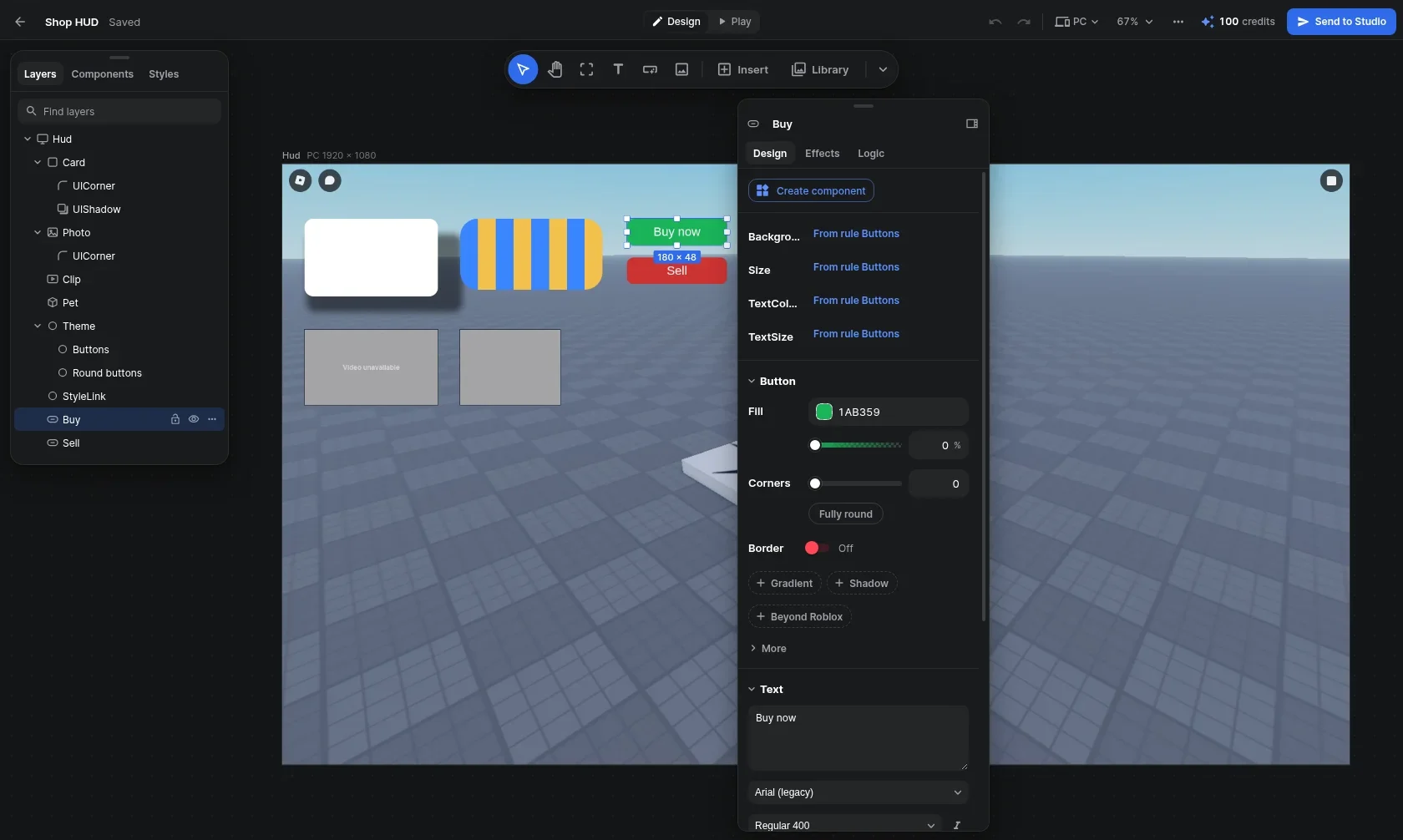
ExtensionDesigner
Developer EditionDesign Roblox UI with effects and logic, then send it to Studio in one click.
Desktop appRoGold 3D
Developer EditionModel, light, pose and render Roblox scenes and meshes, then send them to Studio.
Desktop appMCP server
Developer EditionConnect an AI agent to Roblox Studio and your games through RoGold, even from your phone.
Desktop appMCP Server app
Developer EditionSwitch it on in Studio and your AI agent can build, script, playtest and read the output in your place.
Studio pluginGame passes and products by AI
Developer EditionLet your AI agent read, create and update game passes and developer products.
Desktop appBadges by AI
Developer EditionLet your AI agent read, create and update your badges.
Desktop appAsset upload by AI
Developer EditionLet your AI agent upload images, audio, videos and clothing as assets.
Desktop appDataStore editor
Developer EditionEdit normal and ordered DataStores in your games without opening Studio.
Desktop appRun Luau
Developer EditionRun Luau in your own games without opening Studio.
Desktop appDevEx conversion
FreeWhat your Robux are worth in DevEx.
Desktop appReverse DevEx
FreeEnter the payout you want and see the Robux it takes.
Desktop appPayout splitter
FreeSplit Robux fairly between the people on your team.
Desktop appPrice suggestions
FreePrice points for game passes and products that people are more likely to buy.
Desktop appRevenue estimator
FreeDaily, weekly and monthly revenue from your visits and conversion.
Desktop appStudio plugin updates
Developer EditionThe app keeps your RoGold Studio plugin up to date.
Desktop appDev Panel in the app
Developer EditionRevenue, players and item performance across every experience you own, from the desktop app.
Desktop appStudio time
Developer EditionHow long you spend building in Studio, beside your playtime.
ExtensionAuto Importer
Developer EditionAutocomplete for your modules and services, imported for you when accepted.
Studio pluginImport markers
Developer EditionMark where in a script the Auto Importer puts its imports.
Studio pluginAI context
Developer EditionDescribe any selection and its hierarchy for an AI assistant.
Studio pluginBorder removal
Developer EditionStrip the borders from UI elements, or have new ones made without them.
Studio pluginHide UI
Developer EditionHide your game's UI to see the build behind it.
Studio pluginColor palettes
Developer EditionKeep palettes for your designs and apply any color to your selected UI in a click.
Studio pluginLighting templates
Developer EditionSave your lighting and its effects as templates, and apply them in any place.
Studio pluginCamera light
Developer EditionLight up what you are editing without touching the game's lighting.
Studio pluginCharacter loader
Developer EditionInsert any player's avatar as an R6 or R15 rig, by username or user ID.
Studio pluginModel to camera
Developer EditionMove the selected models and parts to where your camera is.
Studio pluginSurface editor
Developer EditionSet the surfaces of your parts one side at a time, or all at once.
Studio pluginWeld creator
Developer EditionWeld a model to a root you pick with Weld, Motor6D or WeldConstraint.
Studio pluginTool grip editor
Developer EditionMove a tool's grip on a preview arm and watch it update as you go.
Studio pluginClass converter
Developer EditionChange an instance's class, keeping its properties and, if you want, its children.
Studio pluginAuto organizer
Developer EditionSort the Workspace, a service or a selection into folders by type, material, size or name.
Studio pluginPacket profiler
Developer EditionSee what your remotes send while the game runs, and how much.
Studio pluginTo-do list
Developer EditionA to-do list for each game, inside Studio, that you can reorder.
Studio pluginCreator Store previews
Developer EditionA 3D preview of Creator Store assets before you get them.
ExtensionCommunity revenue
FreeA clearer Revenue tab for your communities, with pending Robux, funds and sales.
ExtensionHidden experiences
Developer EditionHide experiences you no longer want in your Developer Panel.
ExtensionDeveloper search
FreeSearch the DevForum, the Creator docs and your own games from PowerSearch.
ExtensionYour games on Home
Developer EditionThe games you make, with the time you have put into each, on your home page.
ExtensionQuick edit
FreeEdit buttons on your own games.
ExtensionEdit in Studio
FreeOpen an uncopylocked place in Studio in one click.
ExtensionDownload place files
FreeDownload the place file of an uncopylocked or owned place.
ExtensionGroup funds in the top bar
Developer EditionYour communities' funds beside your own Robux.
ExtensionSponsor page layout
FreeA two-column layout for the page where you sponsor an item.
ExtensionOwner Stats tab
Developer EditionA Stats tab on your own game's page: players, playtime, Robux and retention against the period before.
ExtensionLive game overview
Developer EditionPlayers, servers, players per server, the day's peak and platform split for your game, live.
ExtensionGame summaries
Developer EditionShort summaries of your last update, top sellers, where players come from and server performance.
ExtensionSimilar game benchmarks
Developer EditionSee how your game's visits, favorites and players compare with similar experiences.
ExtensionStudio activity widget
Developer EditionShow your Studio time, streaks and lines written on your profile, with each day's scripts.
ExtensionEvent planning
Developer EditionA calendar Planning tab with big games' upcoming events, filters, saved presets and a watchlist.
ExtensionBusy times heatmap
Developer EditionWhen players are busiest across tracked games, shown in your own time zone.
ExtensionBest event times
Developer EditionThe best times to run an event in your game, and the days rival games tend to update.
ExtensionEvent reviews
Developer EditionAfter each event, how it did against its estimate, with tips for the next one.
ExtensionEvent clash warning
Developer EditionA warning when big games already have events on the day you schedule yours.
ExtensionEvent schedule alerts
Developer EditionAlerts when a big game announces, moves or cancels an event.
ExtensionCalendar export
Developer EditionDownload the events you follow as a calendar file for Google Calendar or Apple Calendar.
ExtensionDaily stats on game cards
Developer EditionYesterday's daily active users and peak players compared with the day before, on your own games' cards.
ExtensionStudio records
Developer EditionYour longest day in Studio, most lines written in a day and the game you built longest.
ExtensionSchedule Roblox events
Developer EditionCreate, edit and cancel your experience's Roblox events from the calendar.
ExtensionDeveloper commands
Developer EditionA game's live players, daily users and monthly revenue, plus group funds, place downloads and Studio.
ExtensionCommunity revenue charts
UltimateA community's Robux flow over time and a breakdown of its revenue.
ExtensionLive players across your games
Developer EditionThe players in all your experiences right now, added up and updated live.
ExtensionPortfolio revenue
Developer EditionRevenue across your experiences over the last 24 hours, with a trend over a window you choose.
ExtensionMonetization stats
Developer EditionDaily active users, ARPU, conversion and day one retention across your busiest experiences.
ExtensionTop gamepasses and products
Developer EditionYour gamepasses and developer products ranked by the Robux they earned.
ExtensionExperience drilldown
Developer EditionOpen one experience for revenue by source, new and returning players, buyers and platforms.
ExtensionConversion funnels
Developer EditionThe funnels your experience logs with AnalyticsService, step by step.
ExtensionRetention and cohorts
Developer EditionA retention curve and weekly player cohorts for each experience.
ExtensionExperience portfolio table
Developer EditionEvery experience in one table, with its growth over the period you pick.
ExtensionSide-by-side comparisons
Developer EditionCompare two or more experiences or avatar items on one chart, and save the comparisons you use.
ExtensionRisers and fallers
Developer EditionWhich experiences and items grew or fell the most against the period before.
ExtensionPerformance alerts
Developer EditionExperiences whose frame rate or memory use is bad enough for players to notice.
ExtensionRevenue concentration warning
Developer EditionA warning when most of your income comes from one experience, product or item.
ExtensionProduct search
Developer EditionSearch every gamepass and developer product you sell, and open one for its daily revenue.
ExtensionCollections
Developer EditionGroup experiences or items into collections and narrow every view to one of them.
ExtensionCustom date ranges
Developer EditionRead any view over a preset or custom date range, compared with the period before.
ExtensionReport export
Developer EditionExport the panel's figures as CSV or JSON.
ExtensionCustomizable panel layout
Developer EditionDrag the panel's sections into your own order, and hide the figures you do not need.
ExtensionUGC sales dashboard
Developer EditionSales and earnings across your avatar items and your groups', with lifetime totals and a trend.
ExtensionTop UGC items
Developer EditionYour best-selling avatar items over a window you choose.
ExtensionUGC item portfolio
Developer EditionEvery avatar item that sold, searchable and filtered by type and on sale, off sale or sold out.
ExtensionUGC item drilldown
Developer EditionPrice changes, resale activity and earnings by experience for each avatar item you sell.
ExtensionSales by location
Developer EditionWhere your avatar items sold: on the Marketplace or inside experiences.
ExtensionUGC alerts
Developer EditionSales spikes, sell-outs, takedowns and sales milestones across your avatar items.
ExtensionUnderperforming items
Developer EditionAvatar items earning well below what their favorites suggest.
ExtensionWeekly and monthly summaries
Developer EditionYour item earnings and sales by week or month, compared with the period before.
ExtensionStudio activity
Developer EditionYour building days, the projects you worked on and the script lines you changed in each.
ExtensionCreator Store explorer
Developer EditionBrowse a Creator Store model's parts, properties, scripts and animation keyframes before you get it.
ExtensionCreator Store downloads
FreeDownload images, meshes and decals straight from their Creator Store page.
ExtensionDeveloper game menu
FreeLinks to analytics, configuration, localization and server restarts on your own game pages.
ExtensionBackdoor Scanner
Developer EditionScan the scripts in your selection or whole place for patterns that backdoors and infected models use.
Studio pluginAnimations by AI
Developer EditionLet your AI agent create animations for a rig, saved where the Animation Editor keeps its own.
Studio pluginAnimation upload by AI
Developer EditionYour AI agent can export an animation and upload it as an asset, ready to play in your game.
Studio pluginMultiplayer playtests by AI
Developer EditionYour AI agent can act as any one player in a multiplayer playtest.
Studio pluginEdit in RoGold 3D
Developer EditionSend the selected model or part from Studio to RoGold 3D, from a button or a shortcut.
Studio pluginSend from RoGold 3D
Developer EditionSend a RoGold 3D project back to Studio to replace the original, update the last copy or add a new one.
Studio pluginPublish 3D meshes and images
Developer EditionUpload a RoGold 3D project's meshes and textures as assets when you send it to Studio.
Studio pluginLighting from RoGold 3D
Developer EditionBring a RoGold 3D scene's sky, atmosphere, effects and clouds into your place.
Studio pluginFind in Studio
Developer EditionSelect and frame the Studio part linked to your RoGold 3D project.
Studio pluginOpen a place in RoGold 3D
Developer EditionLoad your whole Studio place, with its terrain and lighting, into RoGold 3D.
Studio pluginLines per script
Developer EditionSee how many lines you added and removed in each script during a Studio session.
Studio pluginAI activity log
Developer EditionEvery action your AI agent takes in Studio and how it went, searchable and filterable to just the issues.
Studio pluginPlace exploring by AI
Developer EditionLet your AI agent search your place, walk its hierarchy and read the properties of any instance.
Studio pluginBuilding by AI
Developer EditionLet your AI agent insert, change, move and delete instances, or build whole trees of them at once.
Studio pluginToolbox models by AI
Developer EditionLet your AI agent search the Creator Store and insert the models it finds into your place.
Studio pluginScripting by AI
Developer EditionLet your AI agent read, search, write and edit the scripts in your place.
Studio pluginScript checks by AI
Developer EditionLet your AI agent check every script in your place for syntax errors.
Studio pluginRunning code by AI
Developer EditionLet your AI agent run Luau in Studio, in edit mode or on a playtest's server or client.
Studio pluginPlaytesting by AI
Developer EditionLet your AI agent start and stop playtests, multiplayer tests with up to 8 players included.
Studio pluginPlayer input by AI
Developer EditionLet your AI agent press keys, click buttons and walk the character around during a playtest.
Studio pluginOutput reading by AI
Developer EditionLet your AI agent read Studio's output from both the server and the client.
Studio pluginScreenshots by AI
Developer EditionLet your AI agent take screenshots of the game view, a single model or a single UI.
Studio pluginDevice simulator by AI
Developer EditionLet your AI agent switch Studio's device simulator to any phone, tablet or console, in any orientation.
Studio pluginUndo history by AI
Developer EditionEach AI agent can undo and redo its own changes without touching anyone else's.
Studio pluginSelection by AI
Developer EditionYour AI agent can see what you have selected, and select things in Studio for you.
Studio pluginGame context by AI
Developer EditionYour AI agent writes a guide to your game into the place and reads it again in later sessions.
Studio pluginSeveral AI agents at once
Developer EditionSeveral AI agents can build in one Studio at the same time, each in a section of its own.
Studio plugin3D model generation by AI
Developer EditionLet your AI agent make 3D models from a prompt or an image, published so they are kept.
Studio pluginAsset usage finder
Developer EditionSee where every asset is used in your open place, and select each place it is used.
Studio pluginAsset swap
Developer EditionSwap one asset for another everywhere it is used in your place, as a single undo step.
Studio pluginOpen in Designer
Developer EditionOpen a ScreenGui, SurfaceGui or BillboardGui from Studio in RoGold Designer.
Studio pluginSend from Designer to Studio
Developer EditionSend a design from RoGold Designer into Studio, and update the UI you sent before.
Studio pluginSession time
Developer EditionYour session, work and idle time for each Studio session, counted from real activity.
Studio pluginExternal editor time
Developer EditionWork saved from Rojo or another external editor counts toward your work time.
Studio pluginPlace stats
Developer EditionLive counts of the parts, scripts and instances in your place or your selection.
Studio pluginCode stats
Developer EditionTotal lines, average script length and how many of each script type your place holds.
Studio pluginTeam Create panel
Developer EditionSee who else is building with you in your Team Create session.
Studio pluginTeam Create notifications
Developer EditionA notification when someone joins or leaves your Team Create session.
Studio pluginStudio XP
Developer EditionEarn RoGold XP for every active minute you build in Studio.
Studio pluginDaily points in Studio
Developer EditionClaim your daily RoGold points from a notification in Studio.
Studio pluginPlugin update alerts
Developer EditionTells you in Studio when a newer version of the plugin is out.
Studio pluginCode snippets
Developer EditionSave your own snippets of code and insert them from script autocomplete.
Studio pluginScript templates
Developer EditionScript templates you add to any object in a click, with RemoteEvent and prompt starters ready.
Studio pluginScale and offset converter
Developer EditionSwitch UI position and size between scale and offset in one click.
Studio pluginUI alignment grid
Developer EditionSnap UI to any of nine anchor points in its parent.
Studio pluginUI constraint presets
Developer EditionAdd aspect ratio, corner, padding, text size and scale constraints to many UIs at once.
Studio pluginGradient presets
Developer EditionAdd ready-made gradients such as Sunset, Ocean and Midnight to your UI.
Studio pluginLayout presets
Developer EditionAdd a vertical or horizontal list, or a two or three column grid, to UI in one click.
Studio pluginCopy and paste UI style
Developer EditionCopy the look of one UI element and paste it onto others.
Studio pluginBatch transparency
Developer EditionSet background and text transparency across a whole selection with sliders.
Studio pluginOne-click UI fixes
Developer EditionCenter, fit to parent, reset, auto size or clear constraints and layouts across a selection.
Studio pluginPalette from selection
Developer EditionPull every color out of an existing UI into a new palette.
Studio pluginPopular palettes
Developer EditionStart from ready-made palettes such as Material, Tailwind and Dark Mode.
Studio pluginPalette export
Developer EditionExport a palette as Lua or as hex codes.
Studio pluginContrast checker
Developer EditionCheck text and background colors against WCAG 2.1 contrast levels.
Studio pluginUI zoom
Developer EditionZoom in on a UI in the viewport and pan around it while you keep editing.
Studio pluginTool dock
Developer EditionPin your most used tools to the plugin's dock.
Studio pluginFavorite tools
Developer EditionStar tools to keep them together on your favorites page.
Studio pluginAuto anchor
Developer EditionNew parts are anchored as you add them, so nothing falls while you build.
Studio pluginCollision view
Developer EditionSee the collision shapes of your parts and meshes.
Studio pluginCamera speed
Developer EditionSet how fast Studio's camera moves, right from the plugin.
Studio pluginMirror tool
Developer EditionMirror parts and models across any axis, in place or as a copy.
Studio pluginChain place
Developer EditionRepeat a part or model along an axis as many times as you need.
Studio pluginBatch replace
Developer EditionSwap many parts or models for copies of one, each keeping its place.
Studio pluginStudio window control by AI
Developer EditionLet your AI agent click, drag, scroll and type in the Studio window itself.
Desktop appSeveral Studios for AI
Developer EditionChoose which of your open Studio windows your AI agent works in.
Desktop app3D Renderer workspace
Developer EditionA scene workspace for lighting, posing and rendering, built around Roblox's own lighting.
Desktop app3D Modeler workspace
Developer EditionShape meshes in object and edit modes, Blender style, and send them to Studio.
Desktop app3D projects in Files
Developer EditionProjects save themselves to RoGold Files as compact .rg3d files with a picture of the scene.
Desktop appOpen a Studio place in 3D
Developer EditionBring in the place open in Studio with its lighting and terrain, and pick which Studio when several are open.
Desktop app3D file import
Developer EditionImport FBX, OBJ, glTF, STL, PLY, Collada, Roblox models, places and meshes, and pictures.
Desktop appImport by asset id
Developer EditionBring a Roblox model or mesh into a project from its asset id.
Desktop appRoblox Toolbox search
Developer EditionSearch Roblox's Toolbox for free public models and drop them into a scene, scripts left out.
Desktop app3D asset library
Developer EditionAdd props, nature, ground details, stage sets, shapes, parts and lights from one searchable panel.
Desktop appScene presets
Developer EditionDrop in a whole setting, like Snowy cabin or Neon alley, with lighting, weather, props and terrain.
Desktop appSaved 3D library
Developer EditionSave a selection, a lighting setup, a camera or a whole scene and reuse it in any project.
Desktop appLinked models
Developer EditionBuild a model once, place it in many scenes, and every copy updates when you edit it.
Desktop appScatter brush
Developer EditionPaint copies of a library item over parts, meshes or terrain, and paint them away again.
Desktop appStickers and decals
Developer EditionPress stickers or your own pictures onto parts and meshes as Roblox Decals.
Desktop appReference pictures
Developer EditionStand a picture in the view to model from, or fill the background with it.
Desktop appRoblox terrain in 3D
Developer EditionSee a place's real terrain and water drawn with Roblox's own material textures.
Desktop appMesh edit mode
Developer EditionEdit the vertices, edges and faces of several selected meshes together.
Desktop appExtrude
Developer EditionExtrude faces as one region, along their normals, or each face on its own.
Desktop appInset faces
Developer EditionInset faces as one region or each face on its own, with thickness and depth.
Desktop appBevel
Developer EditionRound off selected edges or cut off selected corners.
Desktop appLoop cut
Developer EditionPoint at an edge to cut a loop across it, then slide it into place.
Desktop appKnife tool
Developer EditionClick points across faces to cut new edges wherever you need them.
Desktop appSpin
Developer EditionSweep a selection round the 3D cursor like a lathe.
Desktop appBridge and fill
Developer EditionJoin two edge loops with faces, or fill a gap with a new face.
Desktop appReshaping tools
Developer EditionEdge slide, vertex slide, rip, split, poke, smooth, and shrink or fatten a selection.
Desktop appMerge and dissolve
Developer EditionMerge at the centre, at the cursor or by distance, and dissolve or delete what is selected.
Desktop appTopology tools
Developer EditionSubdivide, triangulate, turn triangles into quads, and flip or recalculate normals.
Desktop appSeparate and join
Developer EditionSplit faces off into a mesh of their own, or join meshes into one.
Desktop appSmart mesh selection
Developer EditionSelect loops, rings, linked or similar parts, grow or shrink, with a box, lasso or circle.
Desktop appProportional editing
Developer EditionMoving vertices drags their neighbours along, with a falloff and size you choose.
Desktop app3D snapping
Developer EditionSnap moves to the stud grid, or to vertices, edges or faces under the pointer.
Desktop app3D cursor and pivots
Developer EditionPlace a 3D cursor and choose the pivot that rotating and resizing turn about.
Desktop appOrigin and apply transforms
Developer EditionSet a mesh's origin to its middle, bottom or the cursor, and bake in location, rotation or scale.
Desktop appSmooth and flat shading
Developer EditionShade a mesh smooth, flat, or auto smooth with hard edges at sharp corners.
Desktop appLocal view and hiding
Developer EditionShow only the selection, framed, or hide and reveal parts of a model while you work.
Desktop appAdjust last operation
Developer EditionChange an extrude, bevel or other operation's settings after it is done, as one undo step.
Desktop appModifier stack
Developer EditionStack Array, Bevel, Boolean, Mirror, Solidify, Subdivision, Decimate and more without losing the original.
Desktop appBake to one mesh
Developer EditionJoin a selection into one welded mesh with modifiers applied, kept inside Roblox's limit.
Desktop appMaterial slots
Developer EditionGive some faces their own material slot, each becoming its own MeshPart in Roblox.
Desktop appRoblox materials in 3D
Developer EditionPut Roblox materials, SurfaceAppearance looks and your place's MaterialVariants on parts and meshes.
Desktop appRoblox part properties
Developer EditionEdit shape, material, transparency, physics, pivot and attachments under Roblox's own names.
Desktop appUV unwrap
Developer EditionUnwrap UVs with Smart, Box, Planar, Cylinder or Sphere, keeping the texture looking the same.
Desktop appUV editor
Developer EditionMove, turn, flip and scale a mesh's UVs on the texture square.
Desktop appTexture painting
Developer EditionPaint colour straight onto a mesh's texture in the view, with brush size, opacity and erase.
Desktop appMesh texture files
Developer EditionMake a blank texture, export it as a PNG with its UV layout, or swap in any picture.
Desktop appTexture adjustments
Developer EditionChange a texture's brightness, contrast, saturation and hue.
Desktop appRoblox health check
Developer EditionCheck a build against Roblox's limits and rules as you work, with Fix all for what can be fixed.
Desktop appStudio output preview
Developer EditionSee the exact instances, part counts, triangles and uploads Send to Studio will build.
Desktop appOptimize for Roblox
Developer EditionCut triangles, drop hidden faces, weld vertices, merge meshes and shrink textures in one pass.
Desktop appMesh to parts
Developer EditionRebuild a mesh out of Roblox parts, previewed as a ghost before you apply it.
Desktop appParts to mesh
Developer EditionBake a build of parts into one mesh with the hidden faces between them removed.
Desktop appCollision preview
Developer EditionChoose a mesh's collision fidelity and see the scene as Roblox collides with it.
Desktop appUGC accessory creator
Developer EditionModel, fit, texture, test on other bodies and validate a UGC accessory, ready to upload.
Desktop appSend 3D to Studio
Developer EditionSend a project to Studio, insert a copy, or push changes back over the instance you opened.
Desktop appMesh publishing
Developer EditionPreview meshes in Studio at once, or publish them to Roblox so they stay.
Desktop appScene lighting to Studio
Developer EditionLight the Studio place the way the scene is lit, or open the scene as a new place.
Desktop appRoblox file export
Developer EditionSave a project as a Roblox model (RBXM or RBXMX) or a place (RBXLX).
Desktop appFBX, OBJ and GLB export
Developer EditionExport to FBX, OBJ with MTL, or GLB with textures for Blender, Maya, web viewers and game engines.
Desktop app3D actions in Files
Developer EditionPreview, validate, optimize, convert or send 3D files to Studio from RoGold Files' right-click menu.
Desktop appStill renders
Developer EditionRender a picture in a window that sharpens as you watch, then save the PNG to Files or anywhere.
Desktop appPath traced renders
Developer EditionTrace bounced light, reflections, glass and soft shadows, on the graphics card or the CPU.
Desktop appLive traced preview
Developer EditionPath trace the viewport as you work, grainy while moving and sharper when still.
Desktop appRender quality presets
Developer EditionPick Draft, Good, Best or Max, or set your own samples, bounces and denoising and save them.
Desktop appRoblox render sizes
Developer EditionSize renders for game icons, thumbnails, badges, game passes, profile pictures and 4K banners.
Desktop appAsset thumbnail renders
Developer EditionRender both Roblox thumbnail sizes, 420 by 420 and 768 by 432, as PNGs in one click.
Desktop appTransparent backgrounds
Developer EditionRender with the sky, a solid colour, or nothing behind the subject for a see-through PNG.
Desktop appRender cameras
Developer EditionPlace cameras with field of view, lens or orthographic view, and pick which one renders.
Desktop appCamera window
Developer EditionA live render of the camera's shot in a corner window you can resize or fill the view with.
Desktop appDepth of field
Developer EditionBlur in front of and behind the focus, and click anything in the view to focus on it.
Desktop appMotion blur
Developer EditionSmear moving things in renders, with shutter angle, frame rate and samples you set.
Desktop appComposition guides
Developer EditionLay thirds and other guides and the destination's safe area over the shot.
Desktop appFinishing effects
Developer EditionAdd vignette, film grain, colour fringing and sharpening to renders.
Desktop appAmbient occlusion
Developer EditionSoft contact shading where things meet, in the view and in renders.
Desktop appMirror reflections
Developer EditionFlat shiny surfaces like puddles and floors show true reflections of the scene.
Desktop appVolumetric effects
Developer EditionAdd fog, cloud, smoke, steam, fire and dust as real volumes of air.
Desktop appVolumetric light beams
Developer EditionSpotlights cut visible shafts of light through fog, smoke and dust, with shadows down the beam.
Desktop appParticle emitters
Developer EditionAdd ParticleEmitters from presets like sparkles, fire, rain, magic and confetti, and tune them.
Desktop appWeather effects
Developer EditionAdd rain, snow, ground mist, lightning, falling leaves and floating particles, blown by wind.
Desktop appWeather presets
Developer EditionOne click weather like Thunderstorm, Blizzard, Autumn or Enchanted forest.
Desktop appLighting presets
Developer EditionOver 40 looks from Golden hour to Neon and Product shot, grouped by time of day and style.
Desktop appRoblox lighting controls
Developer EditionSet time of day, ambient, exposure, shadows, atmosphere, clouds, fog, bloom, sun rays and colour.
Desktop app3D skies
Developer EditionPick a ready sky, a Roblox skybox, your own panorama, a gradient or a solid colour.
Desktop appScene lights
Developer EditionPlace point, spot and surface lights with their own colour, range and shadows.
Desktop appViewport shading modes
Developer EditionWork with no lighting, with shadows, or with everything a render shows.
Desktop appStudio or Blender controls
Developer EditionMove things with Studio's drag handles or Blender's G, R and S keys with axis locks.
Desktop appFly camera
Developer EditionFly the view with W A S D, Q and E like Roblox Studio's camera.
Desktop appRoGold 3D MCP tools
Developer EditionLet an AI agent create, edit and screenshot RoGold 3D scenes and meshes over MCP.
Desktop appNiche finder
Developer EditionFind genres and sub genres with lots of players spread over few games and no single game on top.
Desktop appGenre launch benchmarks
Developer EditionSee how new games in each genre did over their first day, week and month, with typical and top results.
Desktop appUpdate impact
Developer EditionSee an estimate of how each update in the last 90 days changed a game's players.
Desktop appCompetitor groups
Developer EditionSave groups of competing games and compare their average players, updates and events over 30 days.
Desktop appTeam Create editors
Developer EditionSee who is editing your experience in Team Create right now.
Desktop appVisual canvas editing
Developer EditionDraw, move, resize and rotate frames, text, buttons and images on a canvas with pan and zoom.
Desktop appRoblox accurate layout
Developer EditionThe canvas lays UI out with Roblox's own rules for scale, offset, anchors, layouts and scaled text.
Desktop appEvery Roblox UI class
Developer EditionInsert any UI class Roblox supports, kept current with each new Studio release.
Desktop appIn-place text editing
Developer EditionDouble click a label to type its text right on the canvas.
Desktop appDevice previews
Developer EditionPreview a design at phone, small phone, tablet, PC, laptop, console and TV screen sizes.
Desktop appPhone and tablet layouts
Developer EditionGive a layer its own size and position on phones or tablets while every other device keeps its own.
Desktop appAuto align
Developer EditionMoving, resizing and drawing keep each layer in the same place on every screen size.
Desktop appRoblox top bar overlay
Developer EditionShow Roblox's top bar and a phone's notch over a screen to check nothing hides under them.
Desktop appGame background preview
Developer EditionShow an uploaded image or a capture of Studio's camera behind your screens to judge them in game.
Desktop appTranslated text check
Developer EditionFind labels that run out of room on phones once text is 40% longer, as it is after translating.
Desktop appController navigation preview
Developer EditionSee how a gamepad moves between buttons, drawn right on the canvas.
Desktop appSnapping guides
Developer EditionMoving and resizing snap to nearby layers, with guide lines showing what lined up.
Desktop appAlign and distribute
Developer EditionLine up or evenly space the selected layers in one click.
Desktop appLayers panel
Developer EditionA layer tree like Studio's Explorer that you can search, drag to reorder, hide and lock.
Desktop appLinked frames
Developer EditionPop a small or buried part of a screen onto its own board to edit it at full size.
Desktop appReusable components
Developer EditionTurn a layer into a component and place copies that follow it, each with its own overrides.
Desktop appShared styles
Developer EditionSave fills, text, borders, corners and shadows as named styles that update every layer using them.
Desktop appRoblox style sheets
Developer EditionEdit StyleSheet tokens and StyleRule properties, including the transitions they ease in with.
Desktop appProperties panel
Developer EditionEveryday controls grouped by box, text, image and layout, with every Studio property one toggle away.
Desktop appAuto layout
Developer EditionLay children out as lists, grids, pages or tables, with wrapping and flex sizing.
Desktop appConstraints and padding
Developer EditionAdd aspect ratio, size, text size and scale constraints and padding from the properties panel.
Desktop appGradient editor
Developer EditionEdit gradient colour and transparency stops on tracks, the way Figma does.
Desktop appNine-slice editor
Developer EditionDrag slice guides over an image to set how it stretches without warping its corners.
Desktop appRich text preview
Developer EditionBold, italic, colour, stroke and other rich text tags show on the canvas as they do in game.
Desktop appReal Roblox fonts
Developer EditionText is drawn with Roblox's own font files from your install, with open lookalikes as a fallback.
Desktop appCustom font files
Developer EditionAdd TTF, OTF or WOFF fonts to a design; their text goes to Studio as a picture of itself.
Desktop appTurn into image
Developer EditionUse blurs, inner shadows, text shadows, blend modes and dashed outlines, sent to Studio as an image.
Desktop app3D viewport previews
Developer EditionViewportFrames show their model in 3D with the camera and lighting Studio will give it.
Desktop appRoblox image and video previews
Developer EditionRoblox images and videos draw from their real files, so crops and slices land where Studio puts them.
Desktop appWorld UI
Developer EditionDesign SurfaceGuis and BillboardGuis for parts in the world as well as ScreenGuis.
Desktop appPath tool
Developer EditionDraw Roblox Path2D lines point by point on the canvas.
Desktop appPaint tool
Developer EditionPaint pictures on the canvas with a brush, eraser, fill, eyedropper, lines and shapes.
Desktop appPattern library
Developer EditionHalftones, dots, grids, studs, stripes, checks and more that redraw as you move their sliders.
Desktop appPicture library
Developer EditionDrop-in art, borders, panels, shadows and game UI pictures you can tint any colour.
Desktop appReady-made looks
Developer EditionGradients, fades, outlines and glass built from Roblox parts, so there is nothing to upload.
Desktop appSave layers to Library
Developer EditionSave any layer as a picture to reuse it in your other designs.
Desktop appPictures from RoGold Files
Developer EditionPlace pictures you keep in RoGold Files straight into a design.
Desktop appAutomatic image uploads
Developer EditionImages upload to your Roblox account once, and each layer shows where moderation stands.
Desktop appEffect library
Developer EditionHundreds of ready-made effects with live previews, filtered by when they play and what they suit.
Desktop appKeyframe animations
Developer EditionBuild your own motions on a timeline of keyframes, each with its own easing and values.
Desktop appButton effects
Developer EditionHover, press, tilt, ripple, jelly, hold to confirm and cooldown effects for buttons.
Desktop appText animations
Developer EditionTypewriter, wave, letter pop, scramble and marquee effects for text.
Desktop appNumber counters
Developer EditionCount up, odometer, timer and plus popups that animate numbers as they change.
Desktop appProgress bar effects
Developer EditionSmooth fills, trails, stripes and a flash when a bar fills up.
Desktop appNotification effects
Developer EditionToasts, badge dots, banner drops and stacked alerts for your game's notifications.
Desktop appCelebration effects
Developer EditionConfetti, coin showers, particles, shockwaves, screen flashes and reward reveals.
Desktop appWindow and page transitions
Developer EditionPop in, slide in, fade, dimmed backgrounds, page slides, crossfades and zoom through.
Desktop appLooping effects
Developer EditionAlways-on shine, pulse, float, spin, glowing outlines and moving gradients.
Desktop appList and scroll effects
Developer EditionStagger in, reorder slides, scroll reveal, edge fades and snapping for lists.
Desktop appController effects
Developer EditionSelection frames and controller prompts for players on console and gamepad.
Desktop appLogic blocks
Developer EditionScratch style blocks that open screens, play effects and sounds, set text and change properties.
Desktop appServer signals
Developer EditionBlocks can send signals to your own server scripts and react to signals sent back.
Desktop appPersonal function library
Developer EditionSave your own Luau functions once and call them from blocks in any design.
Desktop appBlocks as Luau
Developer EditionFlip any block script over to read and copy the Luau it becomes in Studio.
Desktop appPlay mode
Developer EditionTry a design as a player, with clicks, keys, controller, effects and block scripts all running.
Desktop appPlay log
Developer EditionFire server signals by hand while playing and read a log of what would run in game.
Desktop appAI screen generation
Developer EditionDescribe a screen and RoGold AI builds it on the canvas step by step, paid in AI credits.
Desktop appAI layer edits
Developer EditionSelect a layer and ask RoGold AI to change it and what is inside it in a sentence.
Desktop appAI custom icons
Developer EditionLet RoGold AI draw custom icons for the screen it builds when you switch them on.
Desktop appAI Creator Store pictures
Developer EditionRoGold AI places game-style pictures from the Creator Store, checked first so memes and photos stay out.
Desktop appAI layout review
Developer EditionRoGold AI checks a screen it built on two devices and fixes faults like tiny text or overflow.
Desktop appFigma import
Developer EditionBring a Figma frame or file in as a new design, with a list of anything Roblox cannot draw.
Desktop appSend designs to Studio
Developer EditionSend screens to Studio in one click, updating guis you sent or imported before in place.
Desktop appStudio change review
Developer EditionBefore a send, see what changed in Studio since last time and confirm anything it would overwrite.
Desktop appPre-send checks
Developer EditionWarnings about layers sent as pictures, oversized images and text that will not fit, before you send.
Desktop appAuto sync with Studio
Developer EditionEdits reach Studio a few seconds after you make them, and changes made in Studio come back.
Desktop appExport as code
Developer EditionCopy screens as Luau, React Lua, Fusion or Vide modules, effects and block scripts included.
Desktop appDesigns home
Developer EditionAll your designs with live thumbnails, to open, rename, duplicate or delete.
Desktop appAI agent design tools
Developer EditionAI agents can create, edit, send and export your designs through the MCP server.
Desktop appStudio shortcuts
Developer EditionA desktop shortcut that opens a place in Roblox Studio.
Desktop appSpotlight docs search
Developer EditionSearch the Roblox creator documentation from Spotlight.
Desktop appDeveloper panel overlay
Developer EditionRoGold's developer panel for your experiences, opened inside the in-game overlay.
Desktop appYour games on the dashboard
UltimateGames your account made, ready to play or open in Studio from the dashboard.
Desktop appEdit a place as any account
FreeOpen a place in Roblox Studio signed in as the account you choose.
Desktop appStudio Rich Presence
Developer EditionShow the place you are working on in Roblox Studio, and for how long, on Discord.
Desktop appStudio activity status
Developer EditionYour Discord status says whether you are editing, testing or scripting in Studio.
Desktop appRobux in your currency
FreeConvert Robux into any currency at live exchange rates, not only US dollars.
Desktop appRobux purchase value
FreeSee Robux at the price you pay to buy them, with or without Premium.
Desktop appMarketplace fee toggle
FreeTake Roblox's 30% marketplace fee off a figure, or build it into one.
Desktop appWatched library folder
UltimateDrop files into the RoGold Files folder and they show up in the library on their own.
Desktop appFiles Inbox
UltimateNew files wait in an Inbox, already read and measured, until you file them.
Desktop appAsset thumbnails
UltimateModels, meshes and places get 3D thumbnails, and assets that are only on Roblox use Roblox's picture.
Desktop appFull window asset viewer
UltimateOpen any asset full window, zoom and pan images, and step through files with the arrow keys.
Desktop appLive 3D model viewer
UltimateTurn, zoom and move models, meshes and places in a live 3D view.
Desktop appFiles search
UltimateSearch names, tags, notes, file paths and Roblox asset IDs across the library.
Desktop appFiles filters and sorting
UltimateFilter by type, upload status, creator, tag or source, and sort by date, name, size or type.
Desktop appAsset tags
UltimateTag assets with your own labels and filter the library by them.
Desktop appAsset collections
UltimateGroup assets into named collections without copying any files.
Desktop appAsset favorites
UltimateStar the assets you use most and find them in their own Favorites view.
Desktop appAsset archive
UltimateArchive assets out of the way with their files, notes and history kept, and restore them any time.
Desktop appFolders and renaming
UltimateMake folders, then move and rename assets, and the files on disk change to match.
Desktop appBulk asset actions
UltimateSelect many assets to upload, tag, collect, move, archive or delete them together.
Desktop appRoblox creations sync
UltimateThings you and your groups made on Roblox appear in the library and stay up to date.
Desktop appCreator tags
UltimateAssets made by someone else show the creator's picture and name, with a link to their profile.
Desktop appUpload to Roblox
UltimateUpload images, audio, models, animations and FBX meshes to Roblox from the library.
Desktop appUpdate on Roblox
UltimateSpots files changed since upload, so you can update the Roblox asset or upload a new one.
Desktop appLink to a Roblox asset
UltimateConnect a local file to an asset already on Roblox, or unlink it again.
Desktop appInsert into Studio
Developer EditionInsert any asset into the open Studio place, uploading it first if it is not on Roblox yet.
Desktop appInsert placement options
Developer EditionInsert at the camera, the cursor, the selection, set coordinates or the original spot.
Desktop appPlace scans
Developer EditionScan an open Studio place to record which assets it uses and where.
Desktop appProjects view
Developer EditionBrowse scanned experiences and their places, with the assets each one uses.
Desktop appProject health
Developer EditionFlags missing files, broken dependencies, changed uploads and heavy assets in each experience.
Desktop appAsset usage tracking
Developer EditionSee every scanned place and instance path where an asset is used.
Desktop appSelect assets in Studio
Developer EditionSelect an asset's instances in Studio straight from the library.
Desktop appReplace in place
Developer EditionSwap one asset for another in a place, an experience or everywhere it is used, with a preview first.
Desktop appStudio selection lookup
Developer EditionSee what is selected in Studio and which library assets it already uses.
Desktop appAsset health checks
UltimateTriangles, parts, scripts and texture sizes measured for each asset, with heavy ones flagged.
Desktop appDependency checks
UltimateThe meshes, images and sounds an asset needs, with any missing or private ones flagged.
Desktop appFiles Clean Up
UltimateFinds unused, missing, broken and changed assets and offers to archive them, never to delete.
Desktop appDuplicate file finder
UltimateFinds identical copies of the same file so you can archive the extras.
Desktop appAuto organize
UltimateSorts loose files into type folders and clears the Inbox, with a preview first.
Desktop appPrivate notes
UltimateKeep private notes on any asset, and set the description it is uploaded with.
Desktop appRelated assets
UltimateMark assets as variants, sources or alternatives of each other.
Desktop appAsset history
UltimateA timeline of each asset's uploads, edits, inserts, moves and tags.
Desktop appFiles tools for AI agents
Developer EditionYour AI agent can organize your library by rules you write, but never delete files.
Desktop appImport a gui from Studio
Developer EditionTurn any gui in your open Studio place into a new design.
Desktop appSpotlight DevForum search
Developer EditionSearch the Roblox DevForum from Spotlight.
Desktop appWorks with any AI agent
Developer EditionCopy one address into an AI agent and it can work in Studio.
Desktop appRemote MCP tunnels
Developer EditionReach your Studio from anywhere through ngrok, Cloudflare Tunnel or Tailscale Funnel.
Desktop appMCP access key
Developer EditionRequire a secret key before any AI tool can talk to your Studio.
Desktop appUpload approval
Developer EditionUploads an AI tool starts wait for you to allow them, with a preview, unless you turn that off.
Desktop appMCP account choice
Developer EditionChoose which Roblox account AI tools use for products, passes, badges and uploads.
Desktop appDataStore entry search
Developer EditionFind DataStore entries by key prefix and scope, or ordered entries by value range.
Desktop appOrdered DataStore increments
Developer EditionCreate ordered entries and add to their values without writing code.
Desktop appLuau task history
Developer EditionEvery script you ran, with its status, output and logs.
Desktop appLuau script templates
Developer EditionReady-made scripts to start from when running Luau in your games.
Desktop appOne-click plugin install
Developer EditionInstall the RoGold Studio plugin from the app and see which version you have.
Desktop app
Friends and profile
Level up, dress up your profile, and keep up with the people you play with.
Discord Rich Presence
UltimateShow friends on Discord what you are playing or building.
Desktop appLevels and XP
FreeEarn XP by playing, collecting badges and building, with your level on your profile and home page.
ExtensionPoints shop
FreeSpend points on borders, banners, avatar homes, name effects and more for your profile.
ExtensionXP leaderboard
FreeThe top RoGold users by XP on a podium, with each one's level.
ExtensionChat dock
FreeYour conversations in a dock you can keep open on any page.
ExtensionRedesigned communities
FreeA rebuilt community page with About, Forums, Events, Store and Affiliates tabs.
ExtensionFriend notifier
UltimateA sound and a toast when the friends you watch come online.
ExtensionDaily rewards
FreeA seven-day streak of daily rewards with a bonus on the seventh day, claimed from the shop.
ExtensionProfile portfolio
FreeA Portfolio tab on your profile, built from widgets for your games, items and trades.
ExtensionConnection types
FreeLabel friends as family, teammates or best friends, and sort and filter by those labels.
ExtensionFriend activity
FreeWhat each friend last played or worked on, on their card and when you point at them.
ExtensionTrusted friends
FreeMark friends you trust, and accept requests without leaving the page.
ExtensionConnection finder
FreeSort friend requests by followers, mutuals or visits, and show only verified people.
ExtensionCancel friend requests
FreeTake back a friend request you sent, from that person's profile.
ExtensionMutual friends
FreeSee who you have in common on friend lists and profiles.
ExtensionLast online
FreeSee when someone was last online.
ExtensionFriendship details
FreeHow long you have been friends with someone, and where you met.
ExtensionSubplace presence
FreeSee the exact place a friend is in when they play part of a bigger game.
ExtensionFriend usernames
FreeEach friend's @username under their name on your home page.
ExtensionUnfriend history
FreeWho unfriended you in the last three days, how long you were friends and how you met.
ExtensionBulk disconnect
FreeSelect and remove many connections at once, with a review step before anything is removed.
ExtensionJoin privacy toggle
FreeChoose who can join you in experiences, right from your home page.
ExtensionAppear offline
FreeAppear offline to others while you browse in the browser you use RoGold in.
ExtensionAnti-tracking
FreeMake it harder for server snipers to follow your avatar from server to server.
ExtensionBulk unblock
FreeUnblock several people at once from your settings.
ExtensionProfile badges
FreeLevel, leaderboard, membership and verification badges on profiles.
ExtensionBanned profiles
FreeView the profiles of banned users.
ExtensionLocked communities
FreeA locked community still shows its name, emblem and details, with a note on why it is locked.
ExtensionCommunity details
FreeWhen a community was made, and the visits to its places.
ExtensionLeave in bulk
FreeLeave many communities at once, with the ones you own or manage kept safe.
ExtensionCommunity settings, rebuilt
FreeYour community's join rules, privacy, verification and minimum account age on a clearer page.
ExtensionInvite friends to communities
UltimateInvite several friends at once to a community that needs approval to join.
ExtensionRoblox sign-in
FreeConnect your Roblox account, so the widgets show your own stats.
iPhoneMovable chat bubble
FreeChat folds into a small bubble you can drag to either side of the screen.
ExtensionMutual groups
FreeSee the groups you share with someone, counted on their profile and listed beside mutual friends.
ExtensionInactive friends
FreeFind friends who are inactive, banned or deleted, and select them all to unfriend at once.
ExtensionClear out banned accounts
FreeSelect only banned accounts to unfriend, unfollow, accept or ignore in one go.
ExtensionFollowing and followers filters
FreeFilter who you follow and who follows you by verified status, and sort or cap them by follower count.
ExtensionFriends who played
FreeSee which of your friends have played a game, right on its page.
ExtensionUnread chats filter
FreeShow only unread chats in the chat dock, or mark them all as read at once.
ExtensionPrivate roles and role order
FreeMake community roles private to role managers, and move roles up or down the order.
ExtensionForum roundup
FreeNew posts from the forums of all your communities in one feed, with unread posts marked.
ExtensionCommunity funds at a glance
FreeA community's funds beside its name when you manage it.
ExtensionSearch profile creations
FreeSearch someone's games, sort them by most or least played, and include your private ones.
ExtensionFeatured game card
Developer EditionShow off one game on your portfolio with its players, visits, favorites and release date.
ExtensionCreations widgets
Developer EditionPortfolio widgets for the games, UGC, plugins and models you have published.
ExtensionCreator statistics
Developer EditionCombined totals across your games, UGC and Creator Store assets on your portfolio.
ExtensionCreator timeline
Developer EditionYour game releases, publications and milestones in order on your portfolio.
ExtensionMilestone badges
Developer EditionPortfolio badges for passing 100K, 1M or 10M visits and 10K or 100K favorites.
ExtensionStudio heatmap and streaks
Developer EditionA year of Studio activity as a heatmap, your streaks and your personal bests on your portfolio.
ExtensionFeatured group
FreeSpotlight one group on your portfolio, with your role and its members.
ExtensionEdit profile page
FreeChange your display name, About and Roblox profile frame on one page.
ExtensionRoblox profile frames
FreeSee the Roblox profile frames other people wear on their pictures across the site.
ExtensionLevel rewards
FreeClaim cosmetics as you reach new levels, with a notice when a reward is ready.
ExtensionDiscord account link
FreeLink your Discord account to RoGold with a code from the RoGold Discord server.
ExtensionFriends you played with
UltimateEach experience's journal shows the friends you shared a server with.
ExtensionCalendar
FreeA day, week or month calendar of the Roblox events you follow and your plans.
ExtensionPlans with friends
UltimateCreate a plan for a game and time, invite friends and see who is going or maybe.
ExtensionAvailability meets
UltimateFriends paint the times that work on a grid, and the best overlap becomes the plan.
ExtensionJoin plans by link
FreeOpen a shared plan or meet link to add it to your calendar or add your availability.
ExtensionCalendar invite privacy
FreeChoose whether friends, everyone or nobody can invite you to plans and meets.
ExtensionCalendar reminders
FreeA notification when a plan or event is starting, with a button to join it.
ExtensionFriend lookup commands
UltimateWhois, mutual friends, last online, friends in game or Studio, and two users side by side.
ExtensionQuick social actions
UltimateBlock, unblock, unfriend, follow or unfollow anyone by typing their name.
ExtensionChat with any friend
FreeStart a chat from the dock with any friend, even one you have never messaged.
ExtensionXP progress popup
FreeAfter a game, see the XP and points you earned and how close you are to the next level.
ExtensionProfile views
FreeHow many times a profile has been viewed, and a leaderboard of the most viewed users.
ExtensionUltimate reward track
UltimateA second, Ultimate-only cosmetic at every level milestone.
ExtensionBadge XP and points
FreeEach game badge shows the XP and points it pays, more for rarer badges.
ExtensionMonthly points stipend
UltimateUltimate members get points every month to spend in the shop.
ExtensionShop collections
FreeCosmetics grouped into featured collections, each with its own artwork.
ExtensionLimited-stock cosmetics
FreeCosmetics with limited stock, showing how many are left before they sell out.
ExtensionUpcoming drops
FreeCollections that have not launched yet, with a countdown to when they go on sale.
ExtensionShop search and filters
FreeSearch the shop and filter by type and rarity, or sort by price and rarity.
ExtensionCosmetic try-on
FreePreview a cosmetic on your profile and profile card with everything you already wear.
ExtensionCosmetics cart
FreeAdd several cosmetics to a cart and buy them all in one checkout.
ExtensionCosmetic bundles
FreeBuy a set of cosmetics together, with the items you already own taken off the price.
ExtensionCosmetic color variants
FreeUnlock other colors of a cosmetic you own and wear the one you like.
ExtensionMy Items
FreeEvery cosmetic you own by category, with a preview of your full equipped look.
ExtensionBuy points
FreeTop up your points with a card, priced in your own currency.
ExtensionBuy points with Robux
FreeBuy points bundles with Robux instead of a card.
ExtensionPoints history
FreeYour level, the points you have earned and spent, and your recent purchases.
ExtensionReward announcements
FreeA notice when you are given cosmetics, badges, points or XP.
ExtensionDaily rewards popup
FreeOpens your daily reward on the home page, and can keep reminding you until you claim it.
ExtensionCustomize profile
FreeChoose which of your cosmetics to wear in each slot, from one window.
ExtensionAvatar homes
FreeA 3D scene your avatar stands in on your profile.
ExtensionAvatar borders
FreeAnimated borders around your avatar picture.
ExtensionProfile banners
FreeA banner across the top of your profile.
ExtensionProfile backgrounds
FreeA background painted behind your whole profile page.
ExtensionName effects
FreeAnimated effects on your display name, on your profile and around the site.
ExtensionProfile titles
FreeA title shown under your name.
ExtensionProfile card skins
FreeA skin for the card people see when they point at your name.
ExtensionView cosmetics
FreeSee which RoGold cosmetics someone else is wearing.
ExtensionProfiles, rebuilt
FreeA redesigned profile page with a stats bar and About, Creations and Collectibles tabs.
ExtensionProfile stats bar
FreePlace visits, community members, join date, level and more in one bar on every profile.
ExtensionView as visitor
FreePreview your own profile the way other people see it.
ExtensionEdit your About
FreeEdit your profile description in place, with a character counter.
ExtensionBlocked you notice
FreeA notice on a profile when that person has blocked you.
ExtensionProfile quick actions
FreeFollow, chat, unfriend or answer a friend request from buttons at the top of a profile.
ExtensionDonate to creator
FreeSupport a creator by buying their game passes and items, with what they receive shown.
ExtensionSend Robux shortcut
FreeOpen the Robux transfer for someone straight from their profile menu, where Roblox allows it.
ExtensionRolimons profile link
FreeOpen someone's Rolimons page from their profile menu.
ExtensionRoGold badge directory
FreeEvery RoGold badge on one page, split into owned, obtainable, exclusive and unobtainable.
ExtensionNext milestone
FreeHow long until your next RoGold membership milestone badge.
ExtensionAge verified badge
FreeAn 18+ badge beside the name of people who have verified their age.
ExtensionID verified badge
FreeA badge beside the name of people who have verified their ID with Roblox.
ExtensionStaff and star badges
FreeSee when a profile belongs to a Roblox admin or a Roblox Video Star.
ExtensionBadge pinning
UltimatePin one of your badges to the top of your profile, with how rare it is and where it came from.
ExtensionBadge earned dates
FreeThe date each badge was earned, on a profile's badge list.
ExtensionCommunities on profiles
FreeSomeone's communities with their primary one pinned on top, in a list or grid, sorted your way.
ExtensionPrivate places on profiles
FreeA creator's private and unlisted places listed alongside their public games.
ExtensionCreations showcase
FreeSomeone's games in a carousel with active players and visits on each.
ExtensionPortfolio drafts
FreeWork on your portfolio as a draft and publish it when it is ready.
ExtensionPortfolio layout
FreeDrag portfolio widgets into order and resize each one to small, half or full width.
ExtensionWidget privacy
FreeShow each portfolio widget to only you, your friends or everyone.
ExtensionEx-developer tags
FreeGames you no longer have edit access to are marked as past work in your portfolio.
ExtensionFeatured UGC widget
Developer EditionShow off an avatar item you made, and up to four more of your creations.
ExtensionAbout and social widgets
FreeYour description and your social links as portfolio widgets.
ExtensionShowcase captions
Developer EditionAdd your own line of text under each game or item in your portfolio.
ExtensionValue history widget
FreeA chart of your collectibles' value over time, on your profile.
ExtensionTrade performance widget
UltimateYour trade count, win rate and average gain on your profile.
ExtensionTrade revaluation widgets
UltimateWhat your past trades would be worth today, and how their value has moved since.
ExtensionBest and worst trades
UltimateYour strongest and weakest trades, shown on your profile.
ExtensionCompleted trades widget
UltimateYour completed trades on your profile, searchable and downloadable as a CSV.
ExtensionTrade journal
UltimateNotes and tags on your completed trades, shown in your portfolio.
ExtensionFriends page, rebuilt
FreeFriends, followers, following, mutuals and requests on one redesigned page.
ExtensionFriend search
FreeSearch your friends list by name.
ExtensionFriend filters
FreeFilter your friends by type, trusted, verified or banned, on the friends page and Home.
ExtensionFriend sorting
FreeSort friends by name, followers or how long you have been friends.
ExtensionJoin from friend cards
FreeJoin a friend's game straight from their card on your friends list.
ExtensionTrade from friend cards
FreeA Trade button on friends you are able to trade with.
ExtensionCustom connection types
UltimateMake your own friend labels with their own name, color and icon.
ExtensionFriend nicknames
FreeGive a friend a nickname that shows in place of their display name.
ExtensionFull activity log
UltimateEvery game and Studio session RoGold has seen for a friend, on their profile.
ExtensionAccept all requests
FreeAccept every friend request you have in one click.
ExtensionUnfriend alerts
FreeA notice naming anyone who unfriends you, as soon as RoGold spots it.
ExtensionFull unfriend history
UltimateYour whole unfriend history, searchable, with a backup you can download.
ExtensionBulk unfollow
FreeUnfollow many people at once from your Following list.
ExtensionStay online
FreeKeep showing as online while a Roblox tab is open.
ExtensionShow as in Studio
FreeShow as building in Studio at a place you choose. Experimental, and Roblox may reject it.
ExtensionOnline status toggle
FreeChoose who can see you online, right from your home page.
ExtensionCommunity sidebar
FreeAll your communities in a sidebar you can search and sort by name, members or rank.
ExtensionCommunity folders
FreeSort your communities into folders with names and emoji, and drag them into order.
ExtensionCommunity announcements
FreeRead, write and edit announcements with images, drafts and an optional notification to members.
ExtensionCommunity polls
FreeRun single or multiple choice polls in a community, and vote in them.
ExtensionCommunity forums
FreeRead, post, comment and reply in a community's forums, by category.
ExtensionCommunity reactions
FreeReact to forum posts, comments and announcements with the community's emotes.
ExtensionUnread forum posts
FreeUnread posts are marked, and comments count as read once you scroll past them.
ExtensionForum moderation
FreePin, lock and delete forum posts in the communities you moderate.
ExtensionTop community posts
FreeA community's most active forum posts, on its About tab.
ExtensionCommunity events tab
FreeA community's upcoming events, on their own tab.
ExtensionCommunity store tab
FreeA community's items, with search and sorting by sales, favorites or price.
ExtensionMember list filters
FreeFilter a community's members by role and sort them by when they joined.
ExtensionPrevious community names
FreeSee the names a community went by before.
ExtensionAutomatic community banners
FreeCommunities without a cover photo get one from their Discord or YouTube.
ExtensionCommunity quick actions
FreeMake a community your primary, leave it, copy its link or open its settings from one menu.
ExtensionCreate a community
FreeCreate a community with its emblem, cover photo and join rules on a rebuilt page.
ExtensionCommunity information
FreeChange your community's name, emblem, cover photo and description.
ExtensionMember management
FreeSearch members, change their roles, kick, ban and unban them.
ExtensionJoin requests
FreeAccept or decline the people waiting to join your community.
ExtensionRole editor
FreeCreate, rename, rerank and delete roles, and move members between them.
ExtensionRole permissions
FreeSet what each role can do, grouped into clear categories.
ExtensionForum categories
FreeAdd, order, archive and delete forum categories, and choose which roles can use each.
ExtensionBlocked words
FreeKeep words out of your community's posts, with wildcards and bulk adding.
ExtensionSlow mode
FreeLimit how often members can post in your community.
ExtensionAllies and enemies
FreeSend and answer ally requests, and declare or remove enemies, in bulk if you like.
ExtensionCommunity social links
FreeAdd, edit and remove your community's social links, checked as you type.
ExtensionCommunity audit log
FreeEvery action taken in your community, filterable by person and action.
ExtensionCommunity analytics
FreeVisits, members, posts and announcement views over time, compared with the period before.
ExtensionCommunity tier checker
FreeWhich community tier you have reached, and what you still need for the next one.
ExtensionOverlay friends list
UltimateFriends grouped by your server, this game, other games, online and offline, with a people search.
Desktop appFriend last seen
UltimateSee when RoGold last saw an offline friend online, and what they were playing.
Desktop appIn-game chats
UltimateRead and reply to your Roblox chats, or start one with a friend, over the game.
Desktop appIn-game friend requests
UltimateAccept or decline friend requests without leaving the game.
Desktop appIn-game notifications
UltimateYour Roblox notifications and their buttons over the game, plus an activity feed on the overlay's Home.
Desktop appRoGold level in game
UltimateYour RoGold level and progress to the next one, shown while you play.
Desktop appJoin friends in one click
FreeJoin a friend's server straight from the friend list in the app.
Desktop appDiscord join button
UltimateFriends can join your public server from a button on your Discord profile.
Desktop appGame page button
UltimateAdd a button to your Discord status that links to the experience on Roblox.
Desktop appAvatar in Discord status
UltimateUse your Roblox avatar as the small icon on your Discord status.
Desktop appServer player count
UltimateShow how many players are in your server on your Discord status.
Desktop appTime played on Discord
UltimateRun a timer on your Discord status from when you joined the game.
Desktop appGroup stats widget
FreeMember counts for any group, with live thumbnails, on your home screen.
iPhoneStat widget
FreeYour Robux balance, friend count or pending trades on a home screen widget.
iPhone